Reina
Newcomer
- Followers
- 1
- Following
- 3
- Joined
- Feb 10, 2023
- Posts
- 10
- Likes Received
- 13
- Trophy Points
- 3
- Name
- Reina
- Country
- Netherlands
- City/State
- Leek
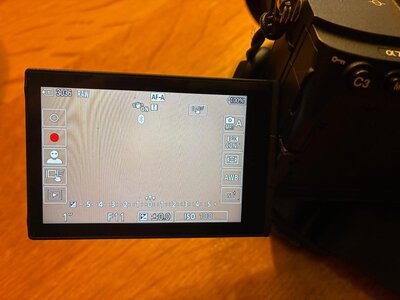
I keep getting a red dot on the screen of my Sony A7IV camera.
I’ve reset the settings a few times (I made a backup of my settings before and reloaded them), but the red dot keeps coming back.
I think it has something to do with quickly switching to video mode, but I have no idea what I’m doing to trigger it. I don’t shoot video, so it’s quite annoying for me.
Does anyone know how to get rid of it or disable it in the settings?
I’ve reset the settings a few times (I made a backup of my settings before and reloaded them), but the red dot keeps coming back.
I think it has something to do with quickly switching to video mode, but I have no idea what I’m doing to trigger it. I don’t shoot video, so it’s quite annoying for me.
Does anyone know how to get rid of it or disable it in the settings?