
The latest firmware update for the Sony a7 IV is version 6.01 after version 6.00 was withdrawn.
Please note that the v6.00 firmware has been pulled by Sony for the following reason:
- Updates should be installed in chronological order. When updating from Ver. 1.01 or earlier, you need to update to Ver. 1.05 first, and then to Ver. 6.01. If you try to install Ver. 6.01 without updating to Ver. 1.05, an error will occur and you will not be able to update your camera.
- This update is only available for memory cards. Windows and macOS versions are not provided.
- You can download the software update using the Creators’ App available in the App Store and Google Play.
Table of Contents[Hide][Show]
If you find this guide helpful then you might also find my Sony a7 IV Memory Card Guide helpful. I’ve tested over 20 memory cards in-camera!
My Sony a7 IV Accessories Guide might come in handy as well.
Sony A7 IV Forum & Facebook Group
If you are looking for further help and advice on the a7 IV or would simply like to share your photos and videos, then please head over to our friendly full-frame Forum. If you prefer Facebook then we also run the Sony A7 IV Shooters Group.
Firmware Version 6.01 Benefits and Improvements
- Fixes an issue where some products were unable to update to Ver. 6.00, as well as an issue where products that successfully updated to Ver. 6.00 would enter power save mode when the monitor was closed, regardless of the Power Save by Monitor setting. We apologize for any inconvenience this may have caused.
- This update also includes the improvements that were introduced in Ver. 6.00.
Shooting & Playback Functions
- Adapts the display layout of shooting information for both horizontal and vertical viewing
- Adds Spot: XL under Spot in the Focus Area menu
- Adds Custom 1, Custom 2, and Custom 3 under Custom in the Focus Area menu
- Adds Tracking: Spot XL, Tracking: Custom 1, Tracking: Custom 2, and Tracking: Custom 3 under Tracking in the Focus Area menu
- Adds the Golden Ratio Grid option to the Grid Line Type setting menu
- Adds the option to enlarge the menu screen display
- Allows you to add OK/NG/KEEP flags to clips during or after movie recording
- Allows the remaining capacity of both storage devices to be displayed during movie recording when using Simult. or Auto Switch Media (Relay Recording)
- Displays audio levels on the screen at all times during movie recording
- Adds support for the Relay Playback function
- Adds a function that allows you to narrow down played-back images using multiple filters (e.g. Rating)
- Allows Custom Key settings to be assigned to the AF-ON, AEL, and Delete buttons during playback
- Adds support for importing/switching multiple IPTC Presets
- Supports the Write Digital Signature function for movies as part of Sony’s Camera Authenticity Solution
- The timing for the provision of licenses (paid) to customers other than certain media outlets is yet to be determined.
- Services may not be available in some countries or regions. For more information, please visit the Authenticity Catalog Page.
- Supports Scan and Tag, Photo Cropping, and Volume Photography Commands under the Volume Photography License
- Installation of a paid license is required for use.
- Services may not be available in some countries or regions.
FTP Transfer and Network Functions
- Allows scheduling of FTP transfers while writing data to the camera’s storage media
- Allows you to automatically schedule FTP transfers of protected movies and still images
- Allows you to automatically protect movies/still images transferred via FTP transfer
- Allows you to transfer specific images with priority during FTP transfer
- Supports the following Monitor & Control app function:
- Focus map display
Note: The latest version of the Monitor & Control app is necessary. The app may not be available in some countries or regions.
- Focus map display
Others
Improves the operational stability of the camera
Firmware Download
You can download the latest firmware from your local Sony support website. The below links will take you to the correct page to download the firmware.
Firmware updates are not country specific, so you can still download a firmware from the US support site for example and install it on your a7 IV in Europe.
Version v1.05 Download
When updating from v1.01 or earlier you need to update to v1.05 first before updating to v5.01. If you are already running 1.05 or later then you can just install v5.01.
- US: Sony Support
- UK: Sony Support
Version v6.01 Download
You can only install v6.01 if you already have v1.05 or later installed. You install will fail if you try to update to v6.01 directly from v1.00 or v1.01.
- US: Sony Support
- UK: Sony Support
Important Note: Since both v1.05 and v6.01 firmware downloads are called BODYDATA.DAT it’s important to delete the v1.05 download from your download folder and memory card before downloading v6.01. Otherwise your computer might rename the v6.01 download (if downloaded second) to something like BODYDATA-2.DAT which the camera won’t recognize unless you then rename it back to BODYDATA.DAT.
Firmware Installation Guide
Here’s a quick guide on how to install the latest firmware on the Sony a7 IV via memory card. If you are using Sony’s Creators App and your A7IV is already on firmware 2.00 or newer than you can also install the firmware via the app.
Important Notes
- Use a fully charged battery & detach any battery grip.
- Do not remove the battery during the update.
- It may not be possible to update if the camera temperature is high, let the camera cool down first.
Step 1: Download the Software Update & Save to Memory Card
- Download the firmware update and save this in the root directory of a freshly formatted memory card.
Step 2: Install the Software Update
- Insert the memory card into slot 1 of the a7IV. Note: Only slot 1 will recognize the system software data.
- Select Menu → Setup → Setup Option → Version and select Software Update.
- Select Execute on the system software update confirmation screen and the update starts.
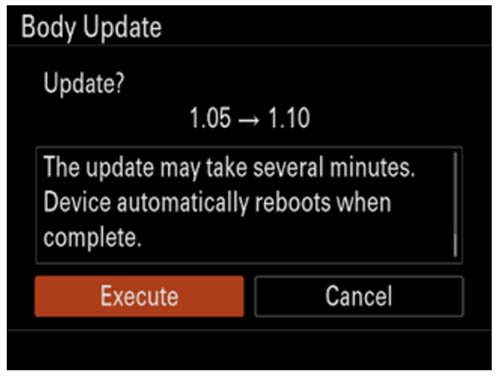
Notes:- A Version Update X.XX → Y.YY message appears (X.XX = the existing version number, Y.YY = the latest version number).
- Do not remove the battery and the memory card during the update.
- When the system software update starts, a black screen is displayed and the access lamp flashes. The access lamp flashes 1 time → 3 times → 5 times depending on the progress of the update. The update will take approximately 5-10 minutes to complete.
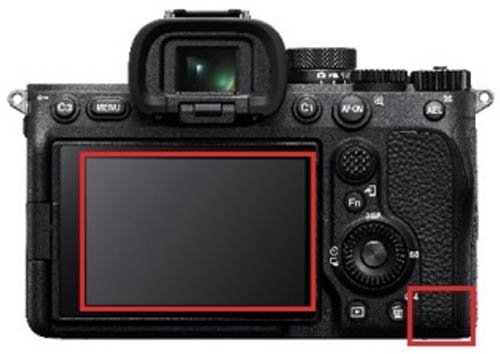
Notes:- If the system software data copy is incorrect, The target model for the update file is incorrect. will be displayed on the monitor of the camera.
- If the access lamp repeats 5 long blinks (0.5sec. cycle) and 6 short blinks (0.25sec. cycle), the system software may not have been copied correctly to the memory card. In this case, remove the battery and memory card from the camera, and start over from Saving system software data to a memory card.
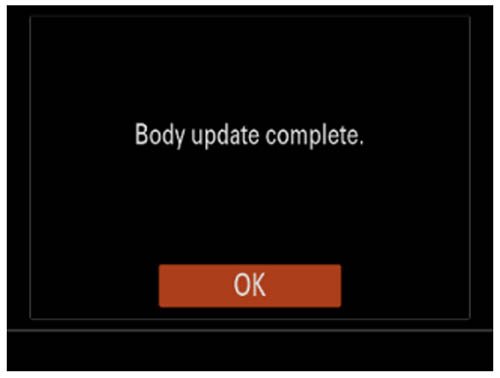
- When the update is completed, the camera will automatically restart.
Step 3: Confirm the System Software Version
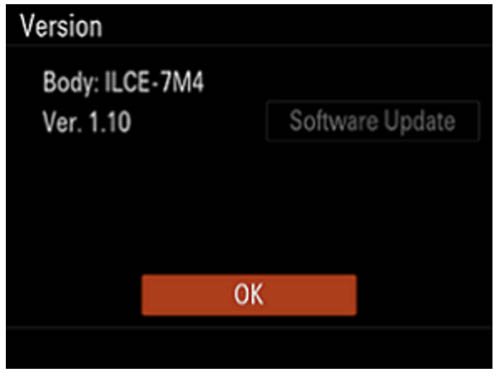
- Select Menu → Setup → Setup Option → Version.
- The system software version is displayed.
Step 4: Format the Memory Card
You should now format the memory card used to install the firmware before you start shooting.
Previous Firmware Versions
Normally improvements from previous firmware versions are always included in the latest firmware version. So even if you have missed a couple of firmware versions, you only ever need to install the latest version. However there is an exception, if you have firmware version 1.00 or 1.01 installed then you will need to install v1.05 before you can install the latest version.
v5.01
- The Security (IPsec) functionality is no longer supported. Please enable and use Access Authen. as it provides more secure protection
- WPA and WEP functionalities are no longer supported. You will no longer be able to select WPA or WEP when connecting to Wi-Fi. Please use the more secure WPA2 or WPA3 moving forward
- Improves the operational stability of the camera
v5.00
- Supports the Write Digital Signature function for still images as part of Sony’s Camera Authenticity Solution
- Fixes an issue where switching the recording frame rate immediately after shooting causes audio and video to be recorded at different speeds or results in unstable operation in subsequent recordings
- Fixes an issue where the cursor does not move correctly when multiple identical items are registered in the function menu
- Fixes an issue where recording video by pressing the MOVIE button in still image shooting mode causes certain button operations to stop working
- Improves the operational stability of the camera
v4.00
- Adds support for focus bracket shooting, which allows for continuous shooting while automatically shifting the focus position
- Introduces additional settings for exposure value adjustments and number of shots in the exposure bracketing
- Adds a function that automatically creates still images with Shot Marks from movie frames after recordings
Note: You can add a Shot Mark while shooting or playing a movie and use it as a mark for selecting, transferring, or editing the movie. - Allows the use of Focus Magnifier and Auto Magnifier in MF while using the Bright Monitoring feature
- Allows notifications to be displayed when the latest software is available for your camera
- You can now continue shooting while transferring captured photos and videos to a smartphone or tablet
Note: Ver. 2.5.0 or later of the Creators’ App is necessary. The Creators’ App may not be available in some countries or regions. For more information, please visit the Creators’ Cloud support website. - Transfer to smartphones and tablets can now be resumed even if interrupted in the middle of a transfer
Note: Ver. 2.5.0 or later of the Creators’ App is necessary. The Creators’ App may not be available in some countries or regions. For more information, please visit the Creators’ Cloud support website. - You can now transfer only the differences that have not yet been transferred to your smartphone or tablet, or add videos to be transferred during the transfer process
Note: Ver. 2.5.0 or later of the Creators’ App is necessary. The Creators’ App may not be available in some countries or regions. For more information, please visit the Creators’ Cloud support website. - Adds support for the Monitor & Control app
Note: The Monitor & Control app connects wirelessly to a camera and enables video monitoring and remote control with a smartphone or tablet.
Ver. 2.1.0 or later of the Monitor & Control app is necessary. The Monitor & Control app may not be available in some countries or regions. - Fixes an issue where peaking display would appear during movie playback
- Improves the functionality and operational stability of the camera
v3.02
- Fixes an issue where the recording for a movie shooting session may be interrupted.
v3.01
- Fixes an issue where the camera may not be able to connect to the network
- Improves the operational stability of the camera
v3.00
- Adds support for Network Streaming function
Notes:- Creators’ App Ver. 2.3.1 or later is necessary. Settings must be made in the Creators’ App in advance. For more information, please visit the Creators’ App support website.
- Creators’ App may not be available in some countries or regions. Please refer to the support page.
- Allows you to upload camera images directly to the Creators’ Cloud app
Notes:- Creators’ App Ver. 2.3.1 or later is necessary. Settings must be made in the Creators’ App in advance. For more information, please visit the Creators’ App support website.
- This service may not be available in some countries or regions. Please refer to the support page.
- Enables display of the Wi-Fi signal strength
- The maximum number of images that can be recorded in one folder has been increased to 9,999
- Adds support for C2PA format.(The license availability date is undecided)
- Adds support for Custom Grid Line
Note: Custom Grid Line is available as a paid license. Availability varies depends on country and region. - Fixes an issue where the time code wasn’t always retained after a power restart
- Fixes an issue where certain custom key operations could cause a restart
- Improves the exposure stability when using extended ISO during movie recordings
- Improves the operational stability of the camera
v
v2.01
- Fixes a Creators’ App issue where the Auto Time Correction and Auto Area Adjustment features turn off
- Improves the operational stability of the camera
v2.00
- Adds support for the Creators’ App
Note: The new Creators’ App mobile application is available to replace the Imaging Edge Mobile app. The Creators’ App allows you to transfer images from the camera to your smartphone, shoot remotely, and use various functions. - Adds functions that improve security when connecting for remote shooting and image transferring with Creators’ App and Imaging Edge Desktop software
Note: Please update the Imaging Edge Desktop software to the latest version (Ver.3.6 or later) - Improves the operational stability of the camera
Important: When updating from Ver. 1.01 or earlier, you need to update to Ver. 1.05 before proceeding with the Ver. 2.00 update. Only update to Ver. 2.00 after updating to Ver. 1.05. If you try to update to Ver. 2.00 without updating to Ver. 1.05, an error will occur and you will not be able to update.
For customers who have been using Imaging Edge Mobile app:
- Updated cameras will no longer be able to connect to Imaging Edge Mobile app. After updating the camera, install the Creators’ App.
- Please make sure Imaging Edge Mobile app is the latest version (Ver.7.7.2 or later) in order to pair the camera with the Creators’ App.
- If you are using an iPhone/iPad, after updating the camera, turn off the Phone/iPad and turn it on again. Then pair the camera with the Creators’ App.
If Imaging Edge Mobile app is not the latest version, update it before trying to pair the camera with the Creators’ App.
For instructions on installing and connecting the Creators’ App, please refer to Migrating from Imaging Edge Mobile app to Creators’ App.
v1.11
- Improves the shutter reliability
- Fixes an issue where the movie file rotated by the camera may not be rotated when displayed on a computer
v1.10
- Allows you to select M and S sizes in addition to L when using the RAW recording lossless compression method
- The shutter speed and ISO sensitivity settings dedicated for flash photography can be retained
- Adds the Touch Shutter function
- Improves the accuracy of the Eye AF feature
- The camera’s serial number can be recorded in the metadata in the movie files
- Improves operability of Wi-Fi connections
- Adds a 1 minute setting to the Power Save by Monitor menu
- Fixes an issue where the viewfinder display may not be brightened according to the ambient brightness
- Improves the operational stability of the camera
Update: Shortly after releasing v1.05 and v1.10 Sony pulled the downloads from their support sites after reports that some people are having issues accessing menus and the camera restarting. The downloads are now available again so hopefully these issues have been resolved.
Sony official statement: “This update was suspended on August 24, 2022, because some products could not operate properly after the update to Ver.1.10. The update has resumed with countermeasures on September 8, 2022. We apologize for your inconvenience. In case you have already updated to Ver.1.10, if you can set RAW File Type to Lossless Compression (L), the issue will not appear. (Added on September 8, 2022)”.
Important: When updating from v1.01 or earlier, you need to update to v1.05 first (released at the same time as v1.10) before updating to v1.10. The install will fail if you try to update to v1.10 directly from v1.00 or v1.01.
v1.05
This firmware update is required before you can update to v1.10 from 1.01 or 1.00.
v1.01
- Improves the accuracy of the Eye AF feature
- Fixes an issue where you may not be able to take photos when using a SEL2860 lens
- Improves the operational stability of the camera
v1.00
This is the firmware version that the camera was first released with.



How can I find firmware V1.01 ? thanks!
Sony firmware ver.3.0 – Sony A7IV. Unnecessary update. It doesn’t solve anything important, the focus is still bad.
I have updated to ver 3.0.
My first photo shoot with the new ver will not open the images in Lightroom, has anybody experienced the same problem and how can i fix it?
OMG! Maybe the computing gods have been sending me a message: DO NOT install v.2.01. How do I know this? Well, for weeks now, I haven’t been able to download the f/w from the Canadian Sony site. I just tried your US link and that doesn’t work either. However, I was able to download the file from the UK site.
Now, I wouldn’t mind using that f/w (if it’d take), but I fear that menu items may be in British English. I really wouldn’t want to use a US f/w either, because, again, the English may be different than ours. Canadian English is somewhere down the middle of US and UK variations.
That’s as far as the menu system goes; I don’t think it has any effects on the h/w (between different English-speaking regions at any rate). All conjecture on my part though; don’t know enough, and am just venting. (It doesn’t only NOT allow the f/w to be downloaded in Canada, I’m then sent into a login-hell-loop!) Like I said, maybe a good thing.
I am attempting to install the version 2.01, updating from 1.20 for an 7 rIV. However, after formatting an SD card, copying bodydata.dat file to root directory of the card and inserting into slot 1 and navigating to the “version” option in the menu it only displays the current body and lens version numbers with no option for software update.
Re-downloaded software, tried two SD cards, multiple formats of cards and reloads of dat file…
Any suggestions for a solution?
HELP!!!!!!!!!!!!! Does anyone have V1.10? I can’t find anywhere. I’ve bricked my camera. screen is totally black on the corner red light blinking no response for hours. V.1.05 doesn’t work. If anyone has V.1.10 please send it to me!? That would be grateful. my email: mediacrackersllc@gmail.com
Does it really fix the eye af accuracy?
Thanks for the update, pity no real additions like the rumoured photo stacking , i wish they would say what exactly what they mean by “operational stability” means as i don’t know if i’m wasting my time updating the firmware or not
After updating my A7IV to firmware 1.1 sometimes it freezes both with Sony and Sigma macro lenses. I read around that could happen doing movies -that I don’t do- I have to pull out the battery to get back to a normal behaviour .
I’m afraid to update to 2.0 to get it even worse. Does anyone have experienced this issue?
Forgot: the firmware is 1.11
Would be possible to go back to an earlier firmware?
Thanks
After v3.00 update for sony a7iv have the option to purchase custom gridlines. But how are custom gridlines installed and imported into c1-c4 (Png files) create them? Purchase/download?
Is there a tutorial on how to do this because i cant find any method/instructions of/about installing custom gridlines. I feel custom gridlines will help with framing and work flow for certain social media apps, like 4:5 5:4 and 9:16 16:9 while remaining in the full sensor 3:2 resolution Great content, love your work, very infirmative, dont stop !!!
I have problems with the v1.11 update too. Does anyone has the v1.10 firmware?
Just tried to update from 1.1 to 1.11 and same issues as others. Just got off phone with tech support and they asking me to send to tech repair. With so many people having issues i doubt its just a corrupted download file. With recent 1.1 fiasco and FX30 firmware issues, Sony has a major interior problem with firmware/software updates. I just got my service confirmation email and dropping off on Monday (im in NYC). I just got my camera back from repair for shutter blade replacement, and now this.
Hard reset does involve, turn off camera, take out battery and all cards, put the camera to on position, and hold down shutter button for 30 seconds. put back into off position and install battery and card.But when i did that even in off position the drive light started blinking same pattern as mentioned before.
Update, apparently the firmware failure bricked my camera, and the main pcb board needs to be replaced. I see others coming out with same firmware update issue.
Really sorry to hear that David. I know many seem to be struggling with this update for some reason but I’ve not heard of anyone else ending up with a bricked camera yet. I can definitely understand you being peeved off, especially if your shutter blades have broken as well! 🙁
Got exactly the same issue when trying to update to the 1.11 release, when saying your camera main board need to be replaced, this is sony support confirming this ?
Hello everyone, I too have this problem! nothing works the device out of service
Yes I have v1.10 but I can’t update to v1.11 have you managed to sort it?
I have v1.10 and having problems trying to update to v1.11. Have yon managed to sort yours out
Hi updated my a7iv from 1.01 to 1.05 and it is good but when i updated from 1.05 to 1.11 it did not push thru. It has been 4 hours blinking in red only. Do you have anything in mind for troubleshooting this? Thank you
If you haven’t sorted this already then try removing the battery and starting over. Format the memory card and download 1.11 again as it could be a corrupt download.
I had no problem installing the .10 update but I tried to do the .11 and I got the five flashing lights in and six flashing lights and now even if I remove the battery and both memory cards and put everything back in the lights are still flashing please tell me there’s something I can do to correct this. Even with both memory cords out it’s still flashing five and six????? I hope there’s some hard reset button depressed if not I’m screwed.
Did you solve this Robert?
I tried updating the camera to 1.05.
And all it does now is flash red
5 long blinks (0.5sec. cycle) and 6 short blinks (0.25sec. cycle).
I have tried 3 times with different SD cards but the screen is black and nothing else happens
How do I get the image back on the screen or how do I get the camera back ??
Because right now I can’t do anything at all.
This generally indicates that the install has failed. What happens when you restart the camera? It should still work with the previous firmware. Most likely your firmware download is corrupt. Delete the original download from your download directory and try downloading it again before copying over to the memory card, make sure you remove the previous firmware form the memory card too!
V1.20 is now out and has to be installed from your Mac/PC. I CANNOT get this to work, I’m working on a 2022 Mac Studio and for some reason all of Sony’s driver assistants and installers just don’t seem to do the trick. The issues seems to be the update software not being able to find the camera, even though the camera mounts on my Mac. HELP! is anyone else having this issue?
Urgh ignore that… I just realised google kept sending me to the a7Riv page… silly me!