
The latest firmware update for the Sony a7 IV is version 6.01 after version 6.00 was withdrawn.
Please note that the v6.00 firmware has been pulled by Sony for the following reason:
- Updates should be installed in chronological order. When updating from Ver. 1.01 or earlier, you need to update to Ver. 1.05 first, and then to Ver. 6.01. If you try to install Ver. 6.01 without updating to Ver. 1.05, an error will occur and you will not be able to update your camera.
- This update is only available for memory cards. Windows and macOS versions are not provided.
- You can download the software update using the Creators’ App available in the App Store and Google Play.
Table of Contents[Hide][Show]
If you find this guide helpful then you might also find my Sony a7 IV Memory Card Guide helpful. I’ve tested over 20 memory cards in-camera!
My Sony a7 IV Accessories Guide might come in handy as well.
Sony A7 IV Forum & Facebook Group
If you are looking for further help and advice on the a7 IV or would simply like to share your photos and videos, then please head over to our friendly full-frame Forum. If you prefer Facebook then we also run the Sony A7 IV Shooters Group.
Firmware Version 6.01 Benefits and Improvements
- Fixes an issue where some products were unable to update to Ver. 6.00, as well as an issue where products that successfully updated to Ver. 6.00 would enter power save mode when the monitor was closed, regardless of the Power Save by Monitor setting. We apologize for any inconvenience this may have caused.
- This update also includes the improvements that were introduced in Ver. 6.00.
Shooting & Playback Functions
- Adapts the display layout of shooting information for both horizontal and vertical viewing
- Adds Spot: XL under Spot in the Focus Area menu
- Adds Custom 1, Custom 2, and Custom 3 under Custom in the Focus Area menu
- Adds Tracking: Spot XL, Tracking: Custom 1, Tracking: Custom 2, and Tracking: Custom 3 under Tracking in the Focus Area menu
- Adds the Golden Ratio Grid option to the Grid Line Type setting menu
- Adds the option to enlarge the menu screen display
- Allows you to add OK/NG/KEEP flags to clips during or after movie recording
- Allows the remaining capacity of both storage devices to be displayed during movie recording when using Simult. or Auto Switch Media (Relay Recording)
- Displays audio levels on the screen at all times during movie recording
- Adds support for the Relay Playback function
- Adds a function that allows you to narrow down played-back images using multiple filters (e.g. Rating)
- Allows Custom Key settings to be assigned to the AF-ON, AEL, and Delete buttons during playback
- Adds support for importing/switching multiple IPTC Presets
- Supports the Write Digital Signature function for movies as part of Sony’s Camera Authenticity Solution
- The timing for the provision of licenses (paid) to customers other than certain media outlets is yet to be determined.
- Services may not be available in some countries or regions. For more information, please visit the Authenticity Catalog Page.
- Supports Scan and Tag, Photo Cropping, and Volume Photography Commands under the Volume Photography License
- Installation of a paid license is required for use.
- Services may not be available in some countries or regions.
FTP Transfer and Network Functions
- Allows scheduling of FTP transfers while writing data to the camera’s storage media
- Allows you to automatically schedule FTP transfers of protected movies and still images
- Allows you to automatically protect movies/still images transferred via FTP transfer
- Allows you to transfer specific images with priority during FTP transfer
- Supports the following Monitor & Control app function:
- Focus map display
Note: The latest version of the Monitor & Control app is necessary. The app may not be available in some countries or regions.
- Focus map display
Others
Improves the operational stability of the camera
Firmware Download
You can download the latest firmware from your local Sony support website. The below links will take you to the correct page to download the firmware.
Firmware updates are not country specific, so you can still download a firmware from the US support site for example and install it on your a7 IV in Europe.
Version v1.05 Download
When updating from v1.01 or earlier you need to update to v1.05 first before updating to v5.01. If you are already running 1.05 or later then you can just install v5.01.
- US: Sony Support
- UK: Sony Support
Version v6.01 Download
You can only install v6.01 if you already have v1.05 or later installed. You install will fail if you try to update to v6.01 directly from v1.00 or v1.01.
- US: Sony Support
- UK: Sony Support
Important Note: Since both v1.05 and v6.01 firmware downloads are called BODYDATA.DAT it’s important to delete the v1.05 download from your download folder and memory card before downloading v6.01. Otherwise your computer might rename the v6.01 download (if downloaded second) to something like BODYDATA-2.DAT which the camera won’t recognize unless you then rename it back to BODYDATA.DAT.
Firmware Installation Guide
Here’s a quick guide on how to install the latest firmware on the Sony a7 IV via memory card. If you are using Sony’s Creators App and your A7IV is already on firmware 2.00 or newer than you can also install the firmware via the app.
Important Notes
- Use a fully charged battery & detach any battery grip.
- Do not remove the battery during the update.
- It may not be possible to update if the camera temperature is high, let the camera cool down first.
Step 1: Download the Software Update & Save to Memory Card
- Download the firmware update and save this in the root directory of a freshly formatted memory card.
Step 2: Install the Software Update
- Insert the memory card into slot 1 of the a7IV. Note: Only slot 1 will recognize the system software data.
- Select Menu → Setup → Setup Option → Version and select Software Update.
- Select Execute on the system software update confirmation screen and the update starts.
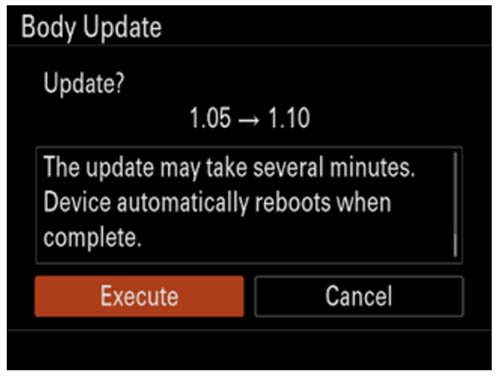
Notes:- A Version Update X.XX → Y.YY message appears (X.XX = the existing version number, Y.YY = the latest version number).
- Do not remove the battery and the memory card during the update.
- When the system software update starts, a black screen is displayed and the access lamp flashes. The access lamp flashes 1 time → 3 times → 5 times depending on the progress of the update. The update will take approximately 5-10 minutes to complete.
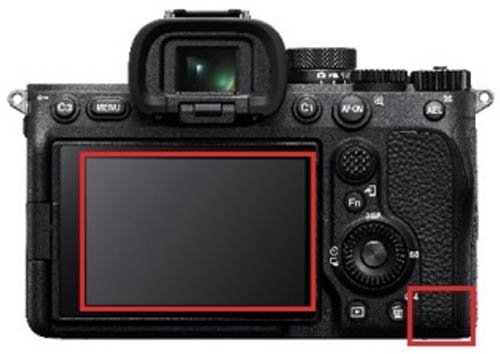
Notes:- If the system software data copy is incorrect, The target model for the update file is incorrect. will be displayed on the monitor of the camera.
- If the access lamp repeats 5 long blinks (0.5sec. cycle) and 6 short blinks (0.25sec. cycle), the system software may not have been copied correctly to the memory card. In this case, remove the battery and memory card from the camera, and start over from Saving system software data to a memory card.
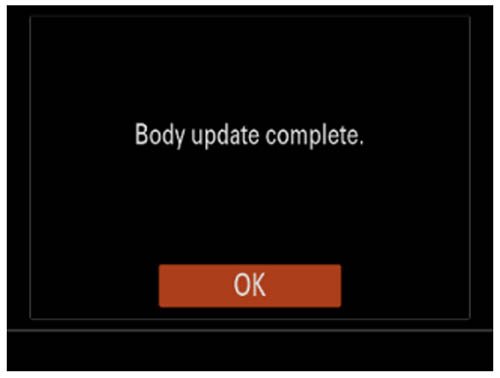
- When the update is completed, the camera will automatically restart.
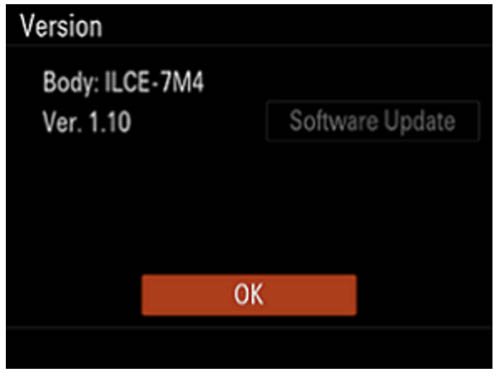
Step 3: Confirm the System Software Version
- Select Menu → Setup → Setup Option → Version.
- The system software version is displayed.
Step 4: Format the Memory Card
You should now format the memory card used to install the firmware before you start shooting.
Previous Firmware Versions
Normally improvements from previous firmware versions are always included in the latest firmware version. So even if you have missed a couple of firmware versions, you only ever need to install the latest version. However there is an exception, if you have firmware version 1.00 or 1.01 installed then you will need to install v1.05 before you can install the latest version.
v5.01
- The Security (IPsec) functionality is no longer supported. Please enable and use Access Authen. as it provides more secure protection
- WPA and WEP functionalities are no longer supported. You will no longer be able to select WPA or WEP when connecting to Wi-Fi. Please use the more secure WPA2 or WPA3 moving forward
- Improves the operational stability of the camera
v5.00
- Supports the Write Digital Signature function for still images as part of Sony’s Camera Authenticity Solution
- Fixes an issue where switching the recording frame rate immediately after shooting causes audio and video to be recorded at different speeds or results in unstable operation in subsequent recordings
- Fixes an issue where the cursor does not move correctly when multiple identical items are registered in the function menu
- Fixes an issue where recording video by pressing the MOVIE button in still image shooting mode causes certain button operations to stop working
- Improves the operational stability of the camera
v4.00
- Adds support for focus bracket shooting, which allows for continuous shooting while automatically shifting the focus position
- Introduces additional settings for exposure value adjustments and number of shots in the exposure bracketing
- Adds a function that automatically creates still images with Shot Marks from movie frames after recordings
Note: You can add a Shot Mark while shooting or playing a movie and use it as a mark for selecting, transferring, or editing the movie. - Allows the use of Focus Magnifier and Auto Magnifier in MF while using the Bright Monitoring feature
- Allows notifications to be displayed when the latest software is available for your camera
- You can now continue shooting while transferring captured photos and videos to a smartphone or tablet
Note: Ver. 2.5.0 or later of the Creators’ App is necessary. The Creators’ App may not be available in some countries or regions. For more information, please visit the Creators’ Cloud support website. - Transfer to smartphones and tablets can now be resumed even if interrupted in the middle of a transfer
Note: Ver. 2.5.0 or later of the Creators’ App is necessary. The Creators’ App may not be available in some countries or regions. For more information, please visit the Creators’ Cloud support website. - You can now transfer only the differences that have not yet been transferred to your smartphone or tablet, or add videos to be transferred during the transfer process
Note: Ver. 2.5.0 or later of the Creators’ App is necessary. The Creators’ App may not be available in some countries or regions. For more information, please visit the Creators’ Cloud support website. - Adds support for the Monitor & Control app
Note: The Monitor & Control app connects wirelessly to a camera and enables video monitoring and remote control with a smartphone or tablet.
Ver. 2.1.0 or later of the Monitor & Control app is necessary. The Monitor & Control app may not be available in some countries or regions. - Fixes an issue where peaking display would appear during movie playback
- Improves the functionality and operational stability of the camera
v3.02
- Fixes an issue where the recording for a movie shooting session may be interrupted.
v3.01
- Fixes an issue where the camera may not be able to connect to the network
- Improves the operational stability of the camera
v3.00
- Adds support for Network Streaming function
Notes:- Creators’ App Ver. 2.3.1 or later is necessary. Settings must be made in the Creators’ App in advance. For more information, please visit the Creators’ App support website.
- Creators’ App may not be available in some countries or regions. Please refer to the support page.
- Allows you to upload camera images directly to the Creators’ Cloud app
Notes:- Creators’ App Ver. 2.3.1 or later is necessary. Settings must be made in the Creators’ App in advance. For more information, please visit the Creators’ App support website.
- This service may not be available in some countries or regions. Please refer to the support page.
- Enables display of the Wi-Fi signal strength
- The maximum number of images that can be recorded in one folder has been increased to 9,999
- Adds support for C2PA format.(The license availability date is undecided)
- Adds support for Custom Grid Line
Note: Custom Grid Line is available as a paid license. Availability varies depends on country and region. - Fixes an issue where the time code wasn’t always retained after a power restart
- Fixes an issue where certain custom key operations could cause a restart
- Improves the exposure stability when using extended ISO during movie recordings
- Improves the operational stability of the camera
v
v2.01
- Fixes a Creators’ App issue where the Auto Time Correction and Auto Area Adjustment features turn off
- Improves the operational stability of the camera
v2.00
- Adds support for the Creators’ App
Note: The new Creators’ App mobile application is available to replace the Imaging Edge Mobile app. The Creators’ App allows you to transfer images from the camera to your smartphone, shoot remotely, and use various functions. - Adds functions that improve security when connecting for remote shooting and image transferring with Creators’ App and Imaging Edge Desktop software
Note: Please update the Imaging Edge Desktop software to the latest version (Ver.3.6 or later) - Improves the operational stability of the camera
Important: When updating from Ver. 1.01 or earlier, you need to update to Ver. 1.05 before proceeding with the Ver. 2.00 update. Only update to Ver. 2.00 after updating to Ver. 1.05. If you try to update to Ver. 2.00 without updating to Ver. 1.05, an error will occur and you will not be able to update.
For customers who have been using Imaging Edge Mobile app:
- Updated cameras will no longer be able to connect to Imaging Edge Mobile app. After updating the camera, install the Creators’ App.
- Please make sure Imaging Edge Mobile app is the latest version (Ver.7.7.2 or later) in order to pair the camera with the Creators’ App.
- If you are using an iPhone/iPad, after updating the camera, turn off the Phone/iPad and turn it on again. Then pair the camera with the Creators’ App.
If Imaging Edge Mobile app is not the latest version, update it before trying to pair the camera with the Creators’ App.
For instructions on installing and connecting the Creators’ App, please refer to Migrating from Imaging Edge Mobile app to Creators’ App.
v1.11
- Improves the shutter reliability
- Fixes an issue where the movie file rotated by the camera may not be rotated when displayed on a computer
v1.10
- Allows you to select M and S sizes in addition to L when using the RAW recording lossless compression method
- The shutter speed and ISO sensitivity settings dedicated for flash photography can be retained
- Adds the Touch Shutter function
- Improves the accuracy of the Eye AF feature
- The camera’s serial number can be recorded in the metadata in the movie files
- Improves operability of Wi-Fi connections
- Adds a 1 minute setting to the Power Save by Monitor menu
- Fixes an issue where the viewfinder display may not be brightened according to the ambient brightness
- Improves the operational stability of the camera
Update: Shortly after releasing v1.05 and v1.10 Sony pulled the downloads from their support sites after reports that some people are having issues accessing menus and the camera restarting. The downloads are now available again so hopefully these issues have been resolved.
Sony official statement: “This update was suspended on August 24, 2022, because some products could not operate properly after the update to Ver.1.10. The update has resumed with countermeasures on September 8, 2022. We apologize for your inconvenience. In case you have already updated to Ver.1.10, if you can set RAW File Type to Lossless Compression (L), the issue will not appear. (Added on September 8, 2022)”.
Important: When updating from v1.01 or earlier, you need to update to v1.05 first (released at the same time as v1.10) before updating to v1.10. The install will fail if you try to update to v1.10 directly from v1.00 or v1.01.
v1.05
This firmware update is required before you can update to v1.10 from 1.01 or 1.00.
v1.01
- Improves the accuracy of the Eye AF feature
- Fixes an issue where you may not be able to take photos when using a SEL2860 lens
- Improves the operational stability of the camera
v1.00
This is the firmware version that the camera was first released with.



Finally updated my a7iv. First the v1.05 and finally the v1.10 this is my first update from owning the camera back on the v1.00 firmware it shipped with. Everything seemed to go pretty smoothly and took no longer than 10mins to do both, minus the actual firmware download time that is.
My eye af now after the update feels kinda worse for some reason , before it was only on eyes with “normal” light conditions. Now i see it focuses sometimes on nose or cheek or ear. feels like the focus rate dropped on photography mode
I just updated to v1.10 and now I am having trouble accessing Menu Settings like Setup Option & Image Quality. Anyone else have this problem?
There were reports of people having this problem with the first release, but the updated downloads should have fixed this. I’ve heard some people have fixed it by resetting the camera.
I updated with the first 1.10 Version (the one that Sony called back) I do have some problems since like no menu access.
Today I downloaded the “new” 1.10 version. When I tried to install this, the camera says something like “version already exists”
No idea, what to do now….my camera simply doesn’t work no more.?
Same here. Can’t change the RAW file type and can’t update from the buggy v1.10 to the new v1.10. It is highly unconventional to release two different versions with the exact same version number- The camera will only allow you to update if the version of the new image is greater than the version already installed. Thus, going from 1.10 to 1.10 is not possible.
You would never release two different updates with the same version number. First time I see any company do that 🙂 Of course the new one should have been called 1.11 to distinguish it from the previous. I have written support, but I suspect they will never get back to me. Can only hope the next update, maybe a 1.20, will be released soon.
I updated with no problems EXEPT I am having trouble accessing Menu Settings like Setup Option & Image Quality. Anyone else have this problem? it was the first 1.10 version BUT you cannot update the current version… anybody have a resolution?
A camera reset should fix this but now I’d recommend installing the latest 1.11 firmware update that should hopefully take care of this issue.
I have problems with the 1.10 firmware updated. Yes I have downloaded the firmware v 1.05 and yes I have put the sd card in slot 1, it does not find the update. Someone else got the same problem?
Your download could be corrupt. It didn’t recognise mine the first time, maybe try downloading it again.
I am having the same problem. I’ve started over 5 times now and the camera doesn’t recognize the update from 1.01 to 1.05
Update HELL !!!!!!!!!!
Try downloading the update file again and make sure that it’s named BODYDATA.DAT, as if you’ve downloaded it before it could get automatically renamed to something like BODYDATA-1.DAT. Also try a different memory card formatted in camera and make sure that it’s in slot 1 and not 2. The BODYDATA.DAT needs to be copied to the root directory of the card, so don’t put it into any sub-folders. Good luck!
contrary to the info here, I’m getting 820mb on the 1.10, anyone else?
Hi Darse. Sorry I hadn’t updated the sizes since Sony updated the downloads. v1.05 appears to be the same size but v1.10 is now showing 860.2MB for me. Where are you downloading it from?
I never updated to version V1.01 because of the troubles surrounding apple silicone macs and the whole rigmarole.
Really happy to see they’ve finally implemented SD firmware updates.
Just a waiting game now until they’ve fixed these issues before I get up to date
Just updated to 1.01 on Mac. Had to disable some security feature first.
I’m on an Intel Mac, and I was having the same problems where the updater kept telling me “could not update.” I followed all the instructions (Sony cable, no memory card in camera, etc.).
Then I saw this at the very bottom of the firmware update instructions:
After launching the System Software Updater, the screen for confirming the version does not appear and a Failed to update message is displayed. If this happens, it is possible that you have updated your camera in the past using the System Software Update Helper driver and have not uninstalled that software:
1. Download System Software Update Helper again and uninstall the driver using the uninstaller tool in the Uninstaller folder of the downloaded file.
2. After uninstalling the System Software Update Helper driver, double-click the Update_ILCE7M4V101.dmg to restart the update.
I downloaded the System Software Update Helper, opened it, went into the Uninstall files, uninstalled the software (when did it every get installed?? beats me!), and then I tried updating the A7IV firmware again, and it worked!
Here’s the link to the instructions. Scroll all the way down to the bottom of the page. https://www.sony.com/electronics/support/e-mount-body-ilce-7-series/ilce-7m4/software/00276643
Good luck!
Thank you for sharing this Sophia and I’m very glad to hear that you managed to get it installed eventually. I know that it’s not easy sadly! 🙁
After 1 hour of frustration, this solved it for me. Thank you 🙂
I have 3 windows computers and none of them can update the firmware on my A7 iv. 1 PC is running Window 11 and the other 2 are running Windows 10. The camera connects to the computers using USB Mass Storage. The PCs say there is an error reading the drive but I can access pictures. The sony updater will not connect to the camera. Is there a USB driver missing? Sony has always sucked with software. Pay your programmers a little more and hire ones that like cameras.
Just updated using Win 11, supplied usb cable (sometimes usb c cables make a difference). No problems, updated on the first go around. Will see if eye AF is a bit more accurate and if the “operational stability” is better. Not sure what that means, but, well, ok… At least I didn’t brick it!
Iam also not able to update – followed all instductions step by step – camera is recognised by macOS but the update simply keeps faling…
Have you installed the latest Sony Camera Driver and restarted?
Sony SUCKS at firmware updates with their cameras. It’s classic Sony to have a new feature on the a7iv to do firmware updates via an SD card, but don’t implement it. Seems like the powers that be at Sony doesn’t want to make things easy for their dedicated users. ARE YOU READING ANY OF THE FORUMS, SONY?
It is pretty disappointing, especially with the feature there but for whatever reason it can’t be used.
Have you read the instructions? 1.05 fixes update from sdcard. 1.10 is allowed from sdcard.
same problem!! could not update…. why why why!!
windows 11 user
Does not work for me . Canon was so much better for firmware updates
Sorry to hear that Nick. I agree that updates via memory card like Canon has been doing for years are so much easier. I’m lost as to why the a7IV includes this feature but Sony hasn’t used it for the first update! Are you using Windows or Mac?
It’s a nightmare on an M1 Mac – you have to make changes to the pre-boot security settings! Canon, Nikon, Fujifilm, Ricoh – in fact I’d be willing to bet ANY other manufacturer has far better firmware update implementation.
I wasn’t prepared to add the security patch (!!!) on my MacBook Pro M1 Pro, so I ended up borrowing an Intel MacBook to do the update. Even then, it took about half an hour. The following day, I updated the firmware on my Ricoh GR III. I timed the whole process: launching the web page, downloading the update file, formatting the SD card, saving the file on the card, putting the card in the camera and performing the update, checking the update was successful, reformatting the acrd and putting it back in the camera. It took 52 seconds!
I love my Sony cameras, but the firmware update implementation, especially for Mac, is some like some Windows 95 distopian ordeal!
It certainly is pretty bonkers Ian. Especially when they finally added the option to update via memory card to the a7 IV then for whatever reason decided not to use it. It’s like they decided to ship the camera without finishing or testing correctly a very important and helpful feature.
Totally agree. Olympus started sending our firmware updates for your memory card, over 15 years ago. I’m still fighting to get mine updated! Two different M1 Macs, all updated security settings, using the Sony Cable, etc.. checked all the menu settings, and… nada. it’s like getting a gift of a fine single malt, and finding the bottle empty. Argh!
‘
Same here. It is impossible to update A7 IV to 1.01 on an M1 Mac. Luckily I still had my 2015 Intel MacBook Pro which worked.
Hi,
I’m on PC, clearly followed each step (Sony USB cable, No memory card, fully charged battery, USB Mass storage mode, etc..) but every time when the software ask to connect the camera for the update, it says “Update impossible”, even if my camera is detected by my PC (automatically opening several files when connecting my camera)
If anyone got the same issue and found the solution, I’m all ears 🙂
Sorry to hear that Nicolas. I’m not a Windows user so can’t provide much help I’m afraid. Normally its Mac which causes the most problems. I’ve heard that other Windows users need to add a security exception for Sony’s installer, even though this isn’t mentioned in the install notes for Windows.
I’m also not a Windows user. But when you say, “automatically opening several files when connecting my camera” – do you mean image files?
One thing – be sure to remove your SD cards before updating.
I understand that Harry Potter might be needed. At least I’d like his help after hours of trying to update.
Are you using an M1 Mac? If so, I don’t think you’ll find any way to complete it. I have not seen a single person successfully do this update with an M1 Mac, including myself. I had to switch over to an older 2015 MacBook Pro to get the update done.