
Welcome to my Sony A7R V (ILCE-7RM5) memory card guide with actual in-camera speed and buffer tests.
To find out which memory cards are best suited to keeping up with the Sony A7R V’s demanding 61-megapixel files, I’ve tested 23 CFexpress Type A cards and 28 UHS-II SD cards.
But first off, just in case you are unaware, the Sony A7R V features two memory card slots.
Each slot is actually a dual slot compatible with CFexpress Type A (2.0 & 4.0) cards and also SD/SDHC/SDXC (UHS-II / UHS-I) cards.

Table of Contents[Hide][Show]
Introduction
The write speeds found on memory card labels offer limited insight into real-world, in-camera performance, as they typically reflect maximum short burst speeds rather than sustained write speeds.
I’ve therefore tested 51 memory cards in the A7R V to gain the clearest possible understanding of how they actually perform when used in the camera.
Best CFexpress Type-A Memory Cards
In the below table you will find all of the CFexpress Type A cards that I have tested so far in the A7R V by shooting Uncompressed RAW + JPEG L in Hi+ Drive Mode, because this combination pushes the camera and cards the hardest.
I have tested other file types and combinations but not with every card, please scroll down to All File Types – CFexpress vs SD if interested.
Because their performance is so similar, I have grouped them by brand. Except for the slowest four cards that you will find at the bottom of the table.
These results are only valid for the card capacities tested, because sometimes write speeds can vary by capacity.
Swipe left on mobile to view the entire table.
| CFexpress Type A Memory Card | Shots to Fill Buffer * | Buffer Clearing Time in Seconds | Video Rating |
|---|---|---|---|
 Novachips Express 4.0 (1.6 TB) Amazon | Memory Wolf UK | 69 | 10s | VPG400 |
 Novachips Express 4.0 (400 GB) Amazon | Memory Wolf UK | 69 | 10s | VPG400 |
 Lexar Professional Gold Series 2.0 (160 GB) Amazon | B&H Photo | 69 | 10s | VPG400 |
 Lexar Professional Silver Series 2.0 (320 GB) Amazon | 69 | 10s | VPG200 |
 Lexar Professional GOLD 4.0 (256 GB) Amazon | B&H Photo | 69 | 10s | VPG400 |
 Delkin Devices BLACK 4.0 (480 GB) Amazon | B&H Photo | Memory Wolf UK | 68 | 10s | VPG200 |
 Delkin Devices POWER 2.0 (160 GB) Memory Wolf UK | 68 | 10.5s | VPG400 |
 Nextorage NX-A2 PRO 4.0 (160 GB) Amazon | B&H Photo | 68 | 10s | VPG400 VPG800 |
 Nextorage NX-AE 4.0 (500 GB) Amazon | B&H Photo | 68 | 10s | VPG400 |
 Nextorage NX-A2SE 4.0 (512 GB) Amazon | B&H Photo | 68 | 10s | VPG200 |
 ProGrade Digital Iridium 4.0 (480 GB) Amazon | B&H Photo | 68 | 10s | VPG200 |
 SanDisk Pro Cinema 4.0 (480 GB) Amazon | B&H Photo | 67 | 10s | VPG200 |
 Angelbird AV PRO 2.0 SE (160 GB) Amazon | B&H Photo | Memory Wolf UK | 68 | 10s | VPG200 |
 Angelbird AV PRO 4.0 (256 GB) Amazon | B&H Photo | Memory Wolf UK | 67 | 10.5s | VPG400 |
 OWC Atlas Pro 4.0 (240 GB) Amazon | B&H Photo | 67 | 10s | VPG200 |
 Exascend Essential 2.0 (480 GB) Amazon | 68 | 10s | VPG200 |
 Sony CEA-G Tough 2.0 (160 GB) Amazon | B&H Photo | 67 | 10s | VPG400 |
 Sony CEA-G Tough 4.0 (240 GB) Amazon | B&H Photo | 64 | 11s | VPG400 |
 Sony CEA-M Tough 2.0 (960 GB) Amazon | B&H Photo | 61 | 11s | VPG200 |
 Lexar Professional SILVER 4.0 (256 GB) Amazon | B&H Photo | 61 | 11.5s | VPG200 |
 ProGrade Digital 2.0 Gold 2.0 (240 GB) Amazon | B&H Photo | 63 | 13.5s | VPG200 |
 Pergear Master 4.0 (256 GB) Amazon | 57 | 14s | VPG200 |
 Nextorage NX-A2SE 4.0 (256 GB) Amazon | B&H Photo | 52 | 15s | VPG200 |
Please note that the Nextorage NX-A2SE 4.0 (256 GB) card has a much slower sustained write speed than the larger 512 GB version which is why the buffer clears slower. The 256 GB card has a sustained write speed of 400 MB/s vs 850 MB/s for the 512 GB version. The max write speeds on the card labels are identical which makes it very confusing. The Pergear Master 4.0 256 GB also has a slower sustained write speed than the 512 GB version, but I’ve not tested the 512 GB version.
Best UHS-II SD Memory Cards
In the below table you will find all of the UHS-II SD cards that I have tested so far in the A7R V by shooting Uncompressed RAW + JPEG L in Hi+ Drive Mode, because this combination pushes the camera and cards the hardest.
Unlike the CFexpress Type A cards, there is much more variance in performance. I have therefore ranked them by buffer clearing time.
Again, these results are only valid for the card capacities tested, because sometimes write speeds can vary by capacity.
Swipe left on mobile to view the entire table.
| UHS-II SD Memory Card | Shots to Fill Buffer * | Buffer Clearing Time in Seconds | Video Speed Class |
|---|---|---|---|
 Nextorage NX-F2 PRO (256 GB) B&H Photo | Amazon | 43 | 24s | V90 |
 SanDisk Extreme Pro (64 GB) B&H Photo | Amazon | Memory Wolf UK | 43 | 24s | V90 |
 Sony SF-G Tough (64 GB) B&H Photo | Amazon | Memory Wolf UK | 43 | 24s | V90 |
 Delkin Devices BLACK (64 GB) B&H Photo | Memory Wolf UK | 43 | 25s | V90 |
 Delkin Devices POWER (64 GB) B&H Photo | Amazon | Memory Wolf UK | 43 | 25s | V90 |
 ProGrade Digital V90 Iridium (128 GB) B&H Photo | Amazon | 43 | 25s | V90 |
 Angelbird AV Pro Mk 2 V90 (64 GB) B&H Photo | Amazon | Memory Wolf UK | 43 | 25s | V90 |
 Angelbird AV Pro Mk 2 V90 (128 GB) B&H Photo | Amazon | Memory Wolf UK | 43 | 25s | V90 |
 Integral UltimaPro X2 (64 GB) Amazon | 43 | 25s | V90 |
 PNY EliteX-PRO 90 (64 GB) B&H Photo | Amazon | 42 | 26s | V90 |
 Kingston Canvas React Plus (64 GB) B&H Photo | Amazon | Memory Wolf UK | 42 | 26s | V90 |
 Ritzgear Video Pro (64 GB) Amazon | 42 | 26s | V90 |
 Lexar Professional 2000X (64 GB) B&H Photo | Amazon | Memory Wolf UK | 43 | 27s | V90 |
 Exascend Catalyst (128 GB) B&H Photo | Amazon | 42 | 27s | V90 |
 OWC Atlas Ultra (128 GB) B&H Photo | Amazon | 42 | 29s | V90 |
 ProGrade Digital V90 300R (64 GB) B&H Photo | Amazon | 39 | 30s | V90 |
 Sony SF-E (128 GB) B&H Photo | Amazon | Memory Wolf UK | 41 | 31s | V60 |
 Nextorage NX-F2 SE (512 GB) B&H Photo | Amazon | 41 | 32s | V60 |
 Sony SF-M Tough (128 GB) B&H Photo | Amazon | Memory Wolf UK | 40 | 39s | V60 |
 Sony SF-M (64 GB) B&H Photo | Amazon | 40 | 39s | V60 |
 Lexar Professional 1800X (64 GB) B&H Photo | Amazon | 41 | 40s | V60 |
 ProGrade V60 (128 GB) B&H Photo | Amazon | 39 | 43s | V60 |
 Transcend SD 700S (64 GB) B&H Photo | 38 | 48s | V90 |
 Lexar Professional Silver Pro (128 GB) Amazon | 38 | 52s | V60 |
 Angelbird AV Pro MK2 V60 (64 GB) B&H Photo | Amazon | Memory Wolf UK | 38 | 58s | V60 |
 SanDisk Extreme Pro (64 GB) B&H Photo | Amazon | 38 | 59s | V60 |
 Lexar Professional 1667X (64 GB) B&H Photo | Amazon | Memory Wolf UK | 37 | 59s | V60 |
 Sony SF-E (64 GB) B&H Photo | Amazon | Memory Wolf UK | 37 | 79s | V30 |
Please note that the Transcend SD 700S (64 GB) underperformed badly for a V90 card, it was even slower than all of the V60 cards tested which should not be the case. If buying the Sony SF-E card please be aware that the 64 GB version is V30 rated with a 45 MB/s write speed, whilst the 128 GB version is V60 rated and has a much faster 100 MB/s write speed.
About These Tests
All of my in-camera tests were carried out with the Sony A7R V and firmware 4.00 whilst shooting in Uncompressed RAW + JPEG L (Extra Fine). All figures presented in this article are based on my test conditions.
You will most likely see slightly different results when running similar tests because a different scene will generate different file sizes. My test scene generated 129.7 MB Uncompressed RAW files and 44.8 MB JPEG L Extra Fine files.
When shooting with these file sizes and the mechanical shutter in Hi+ (7 fps), the A7R V is writing to the fastest CFexpress cards at an average speed of approximately 600 MB/s.
I chose to use Uncompressed RAW + JPEG L (Extra Fine) for my tests because this pushed the cards harder than testing with the smaller Compressed RAW files + JPEG L, even at 10 fps.
I have tested other file types and combinations but not with every single card, please scroll down to: All File Types – CFexpress vs SD if interested.
My results are only valid for the card capacities tested, because sometimes write speeds can vary by capacity.
All File Types – CFexpress vs SD
I don’t test every single file type for every single card because I’d lose the will to live.
But if you are interested, then here are the approximate figures when using the Novachips Express CFexpress 4.0 400 GB card and also the SanDisk Extreme Pro UHS-II V90 64 GB card.
The JPEG Quality/HEIF Quality was [Extra Fine] and Image Size: [L:60M].
| File Type | Shots to Fill Buffer (CFexpress) * | CFe Buffer Clearing Time (CFexpress) | SD Shots to Fill Buffer (SD) * | SD Buffer Clearing Time (SD) |
|---|---|---|---|---|
| JPEG | 300+ | <2s | 154 | 14s |
| HEIF | 300+ | <2s | 300+ | <2s |
| RAW & JPEG (RAW: Uncompressed) | 69 | 10s | 43 | 24s |
| RAW & HEIF (RAW: Uncompressed) | 179 | 7s | 47 | 23s |
| RAW (Uncompressed) | 300+ | <2s | 51 | 20s |
| RAW & JPEG (RAW: Compressed) | 108 | 17s | 84 | 31s |
| RAW & HEIF (RAW: Compressed) | 300+ | 4s | 94 | 25s |
| RAW (Compressed) | 300+ | <2s | 108 | 20s |
| RAW & JPEG (RAW: Lossless Compressed L) | 79 | 9s | 48 | 17s |
| RAW & HEIF (RAW: Lossless Compressed L) | 300+ | <2s | 57 | 15s |
| RAW (Lossless Compressed L) | 300+ | <2s | 70 | 12s |
| RAW & JPEG (RAW: Lossless Compressed M) | 100 | 8s | 54 | 13s |
| RAW & HEIF (RAW: Lossless Compressed M) | 300+ | <2s | 79 | 10s |
| RAW (Lossless Compressed M) | 300+ | <2s | 183 | 5s |
| RAW & JPEG (RAW: Lossless Compressed S) | 118 | 7s | 59 | 12s |
| RAW & HEIF (RAW: Lossless Compressed S) | 300+ | <2s | 100 | 7s |
| RAW (Lossless Compressed S) | 300+ | <2s | 300+ | <2s |
What Size Memory Card Do You Need?
If you will be shooting a lot of continuous bursts then you will probably want to use at least a 160GB CFexpress Type A card.
If you are not shooting long continuous bursts then you’ll probably be fine with 32GB or 64GB cards and you certainly won’t need the faster CFexpress Type A cards.
For shooting video the size of memory card will depend largely on the format that you are recording in. Or you may be using an external recorder anyway so this won’t be so important.
I’d recommend only using SDXC cards and not SDHC. 32GB cards and smaller are SDHC and use the FAT32 file system. If you shoot video with a SDHC card your files will be split into 4GB chunks which creates extra work in post production.
How Many Images Can Be Recorded on a Memory Card?
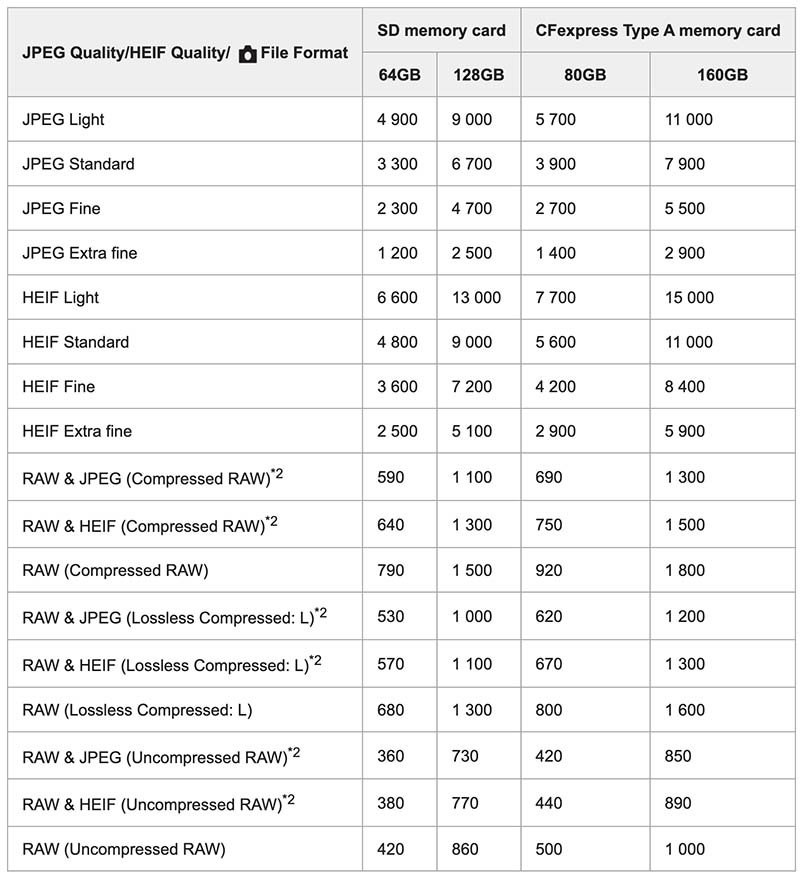
The table below shows the approximate number of images that can be recorded on a memory card formatted in-camera.
These numbers are using a Sony memory card, the [Aspect Ratio] is set to [3:2], and [JPEG Image Size]/[HEIF Image Size] is set to [L: 60M].
Memory Cards for Shooting Video
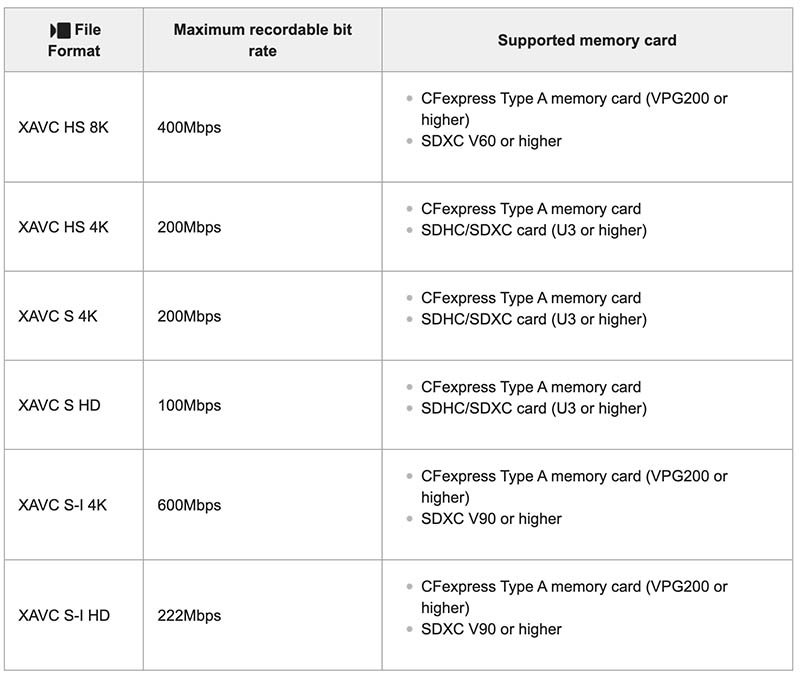
If you plan to shoot video with your A7R V then you’ll need to make sure that you are using the correct memory card for the video format that you are shooting in.
Movie Recording
If you want to shoot video in XAVC S-I 4K (600Mbps) or XAVC S-I HD (222Mbps) then you’ll need to use a V90 rated UHS-II memory card or faster. For the other formats you’ll be fine with a V60 rated card.
S&Q Motion Recording
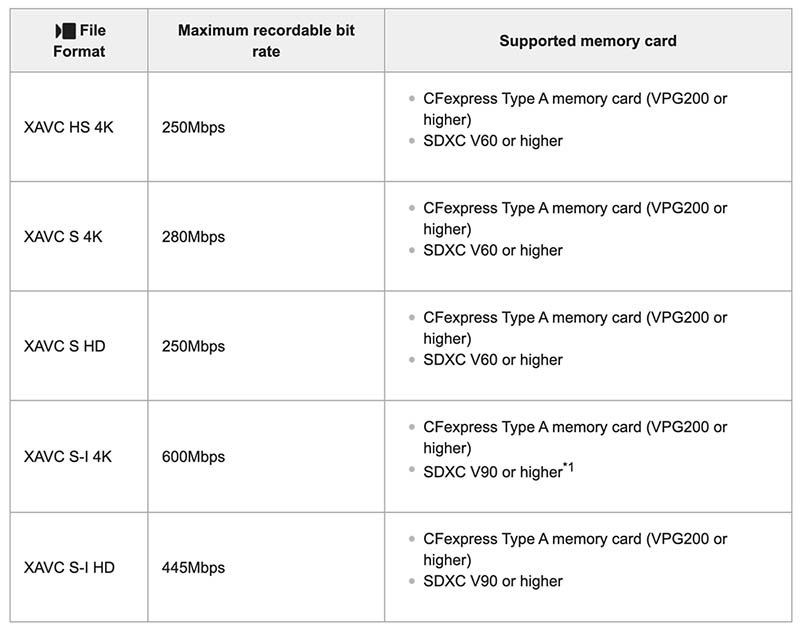
In slow-motion recording, the recording bit rate is higher than usual. When [S&Q Rec Frame Rate] is set to [30p]/[25p]/[24p] and [S&Q Frame Rate] is set to [60fps]/[50fps] for slow-motion recording, a CFexpress Type A memory card (VPG200 or higher) will be required.
Movie Recording Times
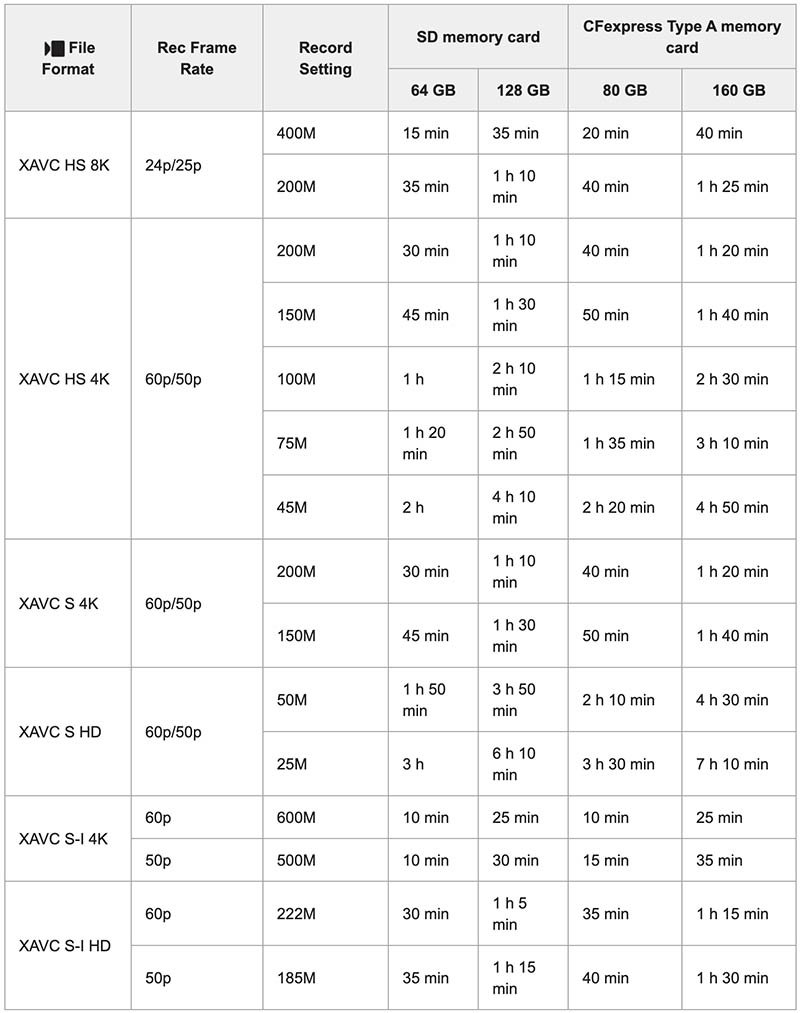
The table below shows the approximate total recording times using a Sony memory card formatted in-camera.
Simultaneous Recording Slot 1 + Slot 2
If you shoot the A7R V simultaneously to both memory card slots then it’s best to use either two identical CFexpress cards or two identical UHS-II cards.
If you use a CFexpress card in slot 1 and a UHS-II card in slot 2, then the write speed is always restricted by the slower UHS-II card.
Memory Card Readers
Mixing memory card and card reader brands often works without issue, but compatibility problems can occasionally occur.
Therefore, I recommend using a card reader that matches your memory cards to reduce the risk of incompatibility. For example, if you use ProGrade memory cards, I’d recommend a ProGrade card reader; if you use Lexar cards, a Lexar reader is the best choice, and so on.
Also keep in mind that transfer speeds will always be limited by either the reader or the maximum card speeds. So don’t be tricked into buying a reader that advertises faster transfer speeds than the cards it supports.
You will see figures like 10 Gb/s, 20 Gb/s or 40 Gb/s. These are the maximum bus speeds for the device. It’s important to note the lowercase b which indicates that this figure is Gigabits per second and not Gigabytes per second. 10 Gb/s = 1250 MB/s.
CFexpress Type A 4.0 Readers
These CFexpress readers support the faster CFexpress Type A 4.0 speeds, they are also backwards compatible with CFexpress Type A 2.0 cards.
| CFexpress Type A 4.0 Reader | * Max Transfer Speed | Price Check |
|---|---|---|
| ProGrade Digital CFexpress 4.0 | 2000 MB/s | B&H Photo | Amazon |
| Nextorage NX-SA1PRO CFexpress 4.0 | 2000 MB/s | B&H Photo | Amazon |
| Novachips CFexpress 4.0 | 2000 MB/s | Memory Wolf UK | Amazon |
| Sony MRW-G3 CFexpress 4.0 | 2000 MB/s | B&H Photo | Amazon |
| Lexar Professional Workflow 4.0 | 2000 MB/s | B&H Photo | Amazon |
CFexpress Type A 2.0 Readers
These CFexpress readers support CFexpress Type A 2.0 speeds, they compatible with CFexpress Type A 4.0 cards but will only transfer data at 2.0 speeds.
| CFexpress Type A 2.0 Reader | * Max Transfer Speed | Price Check |
|---|---|---|
| Angelbird PKT CFexpress 2.0 | 1000 MB/s | B&H Photo | Amazon |
CFexpress Type A 2.0 + SD Dual Slot Readers
These dual readers support CFexpress Type A 2.0 cards, they are compatible with CFexpress Type A 4.0 cards but will only transfer data at 2.0 speeds. They also support SD/SDHC/SDXC (UHS-II / UHS-I) memory cards.
| CFexpress Type A 2.0 + SD Reader | * Max Transfer Speed | Price Check |
|---|---|---|
| Sony MRW-G2 | 1000 MB/s | B&H Photo | Amazon |
| ProGrade Digital | 1000 MB/s | B&H Photo | Amazon |
| Lexar Professional | 1000 MB/s | B&H Photo | Amazon |
UHS-II SD Card Readers
These card readers only support SD/SDHC/SDXC (UHS-II / UHS-I) memory cards.
| UHS-II SD Card Reader | * Max Transfer Speed | Price Check |
|---|---|---|
| Lexar Professional Workflow Dual-Slot | 312 MB/s | B&H Photo | Amazon |
| SanDisk Extreme Pro SD Card USB Type-C | 312 MB/s | B&H Photo | Amazon |
| Kingston Mobilelite Plus | 312 MB/s | B&H Photo | Amazon |
| Sony MRW-S1 UHS-II SD Memory Card Reader | 312 MB/s | B&H Photo | Amazon |
Summary
As you’re probably well aware by now, there’s a wide range of CFexpress Type A and UHS-II SD cards on the market, and figuring out which ones best suit your needs and budget can be challenging.
That said, because the performance of most CFexpress Type A cards is very similar, you may find it simplest to choose a trusted brand or the option that fits your budget best.
If you have no plans to shoot a lot of continuous bursts, then you might find that the UHS-II SD cards are perfectly suitable for your shooting style.
However, the performance of the UHS-II cards varies considerably more than the CFexpress cards, the fastest tested took 24 seconds to clear the buffer and the slowest 79 seconds.
Nextorage is definitely a brand worth considering. The company is based in Japan and run by former Sony employees, and its cards deliver excellent performance and reliability.
Based in South Korea, Novachips is less well known but offers outstanding CFexpress Type A cards at very competitive prices. In fact, they’re arguably the best-performing and best-value options currently available.
Delkin is another personal favorite. Their cards come with excellent lifetime warranties, and the BLACK series includes a 48-hour replacement guarantee on top of a limited lifetime warranty. Delkin also provides dedicated support teams in both the U.S. and Europe.
If you have any questions or can share any feedback on the cards I have tested or cards that I haven’t, please do drop a comment a below.
If you are in the UK please consider purchasing from Memory Wolf which is a store that I also run.
Thanks for reading!
Table of Contents[Hide][Show]
Sony A7R V Guides & Resources


FAQs
The Sony A7R V supports both CFexpress Type A and UHS-I and UHS-II SD in both memory card slots, just not at the same time.
The A7R V supports the CFexpress 2.0 standard. CFexpress 4.0 cards will however work just fine because they are backwards compatible, you just won’t get 4.0 speeds in camera. Where you will benefit from 4.0 cards is when copying files to your computer, that’s providing you are using a 4.0 reader.
CFexpress Type-B are physically a lot larger than Type-A cards, therefore they will not fit in the A7R V’s memory card slots and are not supported.
You’ll find further details on our Sony A7R V Guides & Resources Page and also Sony’s website.


This is extremely high quality work and is very useful. Thank you!
Thanks for the time doing these very useful test. Dumb question: why would companies manufacture CF Type A cards with only Sony using them and also much lower performance than CF Type B??
Thanks.
Gilles
Thanks for commenting Giles. I think there’s probably enough Sony Shooters out there for other companies to justify making Type-A cards, although there’s certainly a lot more producing Type-B cards. Type-B cards might have faster read and write speeds although the Canon R3 is only writing at around 400 MB/s when I tested it compared to around 700 MB/s for the a7R V with the Type-A. So Type-B’s might be faster but the R series cameras in which I’ve tested them aren’t able to make use of that speed right now.
Thanks for the guide! My a7rv came bundled with a Sony cfexpress card (80gb) . I mainly shot stills and a few bursts, usually in raw (slot 1) + jpeg (slot 2) on a7iii old body. How much would a v30 card in slot 2 slow things down for new setup if just recording jpeg fine?
Hi Tim. Sorry for the slow reply. I’ve not tested the buffer when shooting in sort mode RAW/JPEG but typically this won’t slow things down as much as shooting simultaneously to both slots because the JPEGs will be much smaller than the RAW files. I’ve not tested this exact setup so I can’t give you any times, but a UHS V30 card is going to be much slower than a V60 or V90 UHS-II card. You might want to test it but personally I’d be wanting to pair the CF-A card with a V90 or V60 UHS-II card at minimum even for the occasional burst.
Hi Tim, on an upcoming Africa trip, I expect to be shooting almost entirely still photos, rarely if ever video… and expect to do occasional burst mode pics, but not long extended bursts. Your article helped me realize i’d be fine with UHS-II cards over CF Express Type A. But given what I just descirbed, is there any reason I’d need V90 cards vs. the cheaper V60?
Sorry for the slow reply Josh. You could probably get away with using cheaper V60 UHS-II cards if you aren’t shooting too many bursts. I hope you have a fantastic trip!
Very helpful. You probably saved me a lot of money. Just bought the Sony A7Rv and was about to buy a CF Express card for it but realised it would be a waste as I shoot mainly landscape with a bit of wildlife. Thank you.
Glad to have saved you some money Dave! 🙂
Hi Tim, your guides are so helpful. It’s probably obvious but can you comment on the performance of the larger capacity CFexpress cards? For example, would you expect the 320GB version of some of these cards to have the exact same performance as the 160GB or does the larger capacity have an impact? thanks so much for your time!
Hi Ron. Sorry for the slow reply. So far I’ve not noticed a difference in performance between the 80GB and 160GB cards that I have tested. I’ve not had the chance to test any larger cards yet. If there is a difference I would expect it to be marginal and in the field you are unlikely to notice.
Thanks for doing this excellent work!
Please describe your measurement process to determine in-camera “write speed”. I assume by “write speed” you mean the data transfer rate from the camera buffer to the memory card.
Thanks for asking David. Yes by “write speed” I mean transfer rate from buffer to memory card. As far as my process goes I take the total number of shots before hitting the buffer and multiply this by the uncompressed raw file size. I then divide by the total time it has taken to record those shots and empty the buffer, because it starts writing to the buffer as soon as you start shooting not once its full. This gives me the average in-camera write speed.
Hi Tim,
To transfer raw images from a Sony A7RV with a CFexpress Type A card, can the data be transferred direct from the A7RV to a MacBook with the appropriate USB-C cable or is a card reader the only available method for performing the transfer? Do you know? Thank you Tim for your insight!
-Tim L.
Hi Tim. Yes you can also transfer images off the camera to your MacBook using the USB-C cable that’s included in the box. When you connect the camera to your computer and turn it on you’ll see a menu asking you to select the USB Connect Mode. Just select Image Transfer (MSC) and the camera and folders on the card should then show up in Finder on your Mac. The images will be in the DCIM/100MSDCF folders. Hope that helps! 🙂
Perfect, thank you so much Tim! Happy Thanksgiving!