
Welcome to my Sony A1 (ILCE-1) memory card guide with actual in-camera speed and buffer tests.
I’ve tested over 50 memory cards in the Sony A1 to see how the cards actually perform in-camera, as opposed to relying solely on the write speeds printed on the labels.
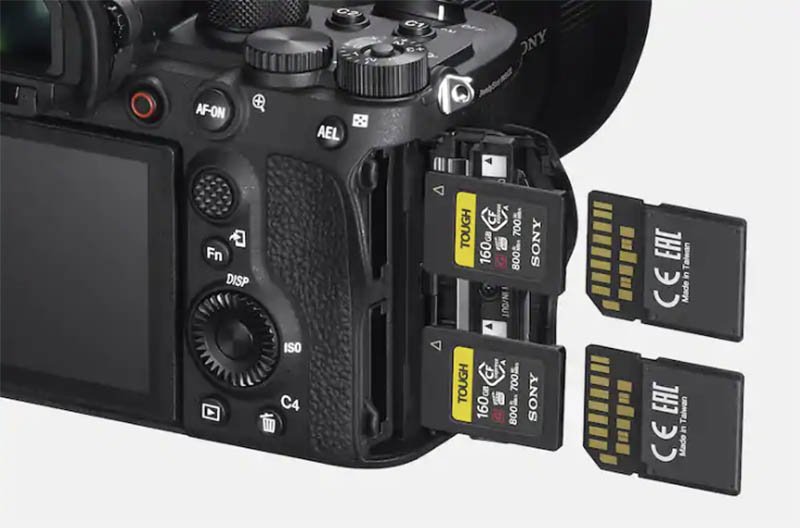
But first off, just in case you are unaware, the Sony A1 features two memory card slots.
Each slot is a dual slot compatible with CFexpress Type A (2.0 & 4.0) memory cards and also SD/SDHC/SDXC (UHS-II / UHS-I) cards.

Table of Contents[Hide][Show]
- Introduction
- Best CFexpress Type-A Memory Cards
- Best UHS-II SD Memory Cards
- About These Tests
- All File Types - CFexpress vs SD
- Which Memory Cards are Compatible?
- Memory Cards for Recording Video
- Memory Cards for S&Q Motion Shooting
- What Size Memory Card Do You Need?
- How Many Images Can Be Recorded on a Memory Card?
- Movie Record Times
- Simultaneous Recording Slot 1 + Slot 2
- Summary
- Sony A1 Guides & Resources
- FAQs
Introduction
The write speeds found on memory card labels don’t really help you to understand how the card will performed when used in a particular camera, as they typically advertise the maximum short burst speeds rather than sustained write speeds.
I’ve therefore tested over 50 memory cards in the Sony A1 to gain the best possible understanding of how they perform when used in-camera.
Occasionally cards can also also underperform in a particular camera, whilst working fine in another. So testing them in-camera helps to identify any problem cards.
Best CFexpress Type-A Memory Cards
In the below table you will find all of the CFexpress Type A cards that I have tested so far in the A1 by shooting Uncompressed RAW + JPEG L in Hi+ Drive Mode (20 FPS).
This combination pushes the cards harder than just shooting RAW alone, or shooting Compressed RAW + JPEG L at 30 FPS.
I have tested other file types and combinations but not with every card, please scroll down to All File Types – CFexpress vs SD if interested.
Because their performance is so similar, I have grouped them by brand. Except for the slowest four cards that you will find at the bottom of the table.
These results are only valid for the card capacities tested, because sometimes write speeds can vary by capacity.
Swipe left on mobile to view the entire table.
| CFexpress Type A Memory Card | Shots to Fill Buffer * | Buffer Clearing Time in Seconds | Video Rating |
|---|---|---|---|
 Novachips Express 4.0 (400 GB) Amazon | Memory Wolf UK | 83 | ~11s | VPG400 |
 Novachips Express 4.0 (1.6 TB) Amazon | Memory Wolf UK | 83 | ~11s | VPG400 |
 Novachips Extreme 4.0 (330 GB) Amazon | 83 | ~11s | VPG400 |
 Lexar Professional Gold Series 2.0 (160 GB) Amazon | B&H Photo | 83 | ~11s | VPG400 |
 Lexar Professional Silver Series 2.0 (320 GB) Amazon | 82 | ~13s | VPG200 |
 Lexar Professional GOLD 4.0 (256 GB) Amazon | B&H Photo | 83 | ~11s | VPG400 |
 Delkin Devices BLACK 4.0 (480 GB) Amazon | B&H Photo | Memory Wolf UK | 82 | ~11.5s | VPG200 |
 Delkin Devices POWER 2.0 (160 GB) Memory Wolf UK | 82 | ~12.5s | VPG400 |
 Nextorage NX-A2 PRO 4.0 (160 GB) Amazon | B&H Photo | 83 | ~11s | VPG400 VPG800 |
 Nextorage NX-AE 4.0 (500 GB) Amazon | B&H Photo | 83 | ~11s | VPG400 |
 Nextorage NX-A2SE 4.0 (512 GB) Amazon | B&H Photo | 83 | ~11.5s | VPG200 |
 ProGrade Digital Iridium 4.0 (480 GB) Amazon | B&H Photo | 83 | ~11s | VPG200 |
 SanDisk Pro Cinema 4.0 (480 GB) Amazon | B&H Photo | 83 | ~11.5s | VPG200 |
 Angelbird AV PRO 2.0 SE (160 GB) Amazon | B&H Photo | Memory Wolf UK | 83 | ~11s | VPG200 |
 Angelbird AV PRO 4.0 (256 GB) Amazon | B&H Photo | Memory Wolf UK | 81 | ~12s | VPG400 |
 OWC Atlas Pro 4.0 (240 GB) Amazon | B&H Photo | 82 | ~11.5s | VPG200 |
 Exascend Essential 2.0 (480 GB) Amazon | 76 | ~12s | VPG200 |
 Sony CEA-G Tough 2.0 (160 GB) Amazon | B&H Photo | 82 | ~12.5s | VPG400 |
 Sony CEA-G Tough 4.0 (240 GB) Amazon | B&H Photo | 77 | ~14.5s | VPG400 |
 Sony CEA-M Tough 2.0 (960 GB) Amazon | B&H Photo | 76 | ~14s | VPG200 |
 Lexar Professional SILVER 4.0 (256 GB) Amazon | B&H Photo | 80 | ~16.5s | VPG200 |
 ProGrade Digital 2.0 Gold 2.0 (240 GB) Amazon | B&H Photo | 74 | ~19.5s | VPG200 |
 Pergear Master 4.0 (256 GB) Amazon | 77 | ~20s | VPG200 |
 Nextorage NX-A2SE 4.0 (256 GB) Amazon | B&H Photo | 73 | ~22s | VPG200 |
Note 1: The Nextorage NX-A2SE 4.0 (256 GB) card has a much slower sustained write speed than the larger 512 GB version which is why the buffer clears slower. The 256 GB card has a sustained write speed of 400 MB/s vs 850 MB/s for the 512 GB version. The max write speeds on the card labels are identical which makes it very confusing. The Pergear Master 4.0 (256 GB) also has a slower sustained write speed than the 512 GB version, but I’ve not tested the 512 GB version.
Note 2: All of the Nextorage CFexpress Type A cards tested were initially writing around 5 seconds slower than I would expect with the A1 on firmware version 1.32. When I upgraded to firmware 4.00 these times aligned with the other cards and my expectations. It also appeared to improve the buffer clearing time of the other cards by around 2 seconds.
Best UHS-II SD Memory Cards
In the below table you will find all of the UHS-II SD cards that I have tested in the A1 by shooting Uncompressed RAW + JPEG L in Hi+ Drive Mode (20 fps).
Unlike the CFexpress Type A cards, there is much more variance in performance. I have therefore ranked them by buffer clearing time.
These results are only valid for the card capacities tested, because sometimes write speeds can vary by capacity.
| UHS-II SD Memory Card | Shots to Fill Buffer * | Buffer Clearing Time in Seconds | Video Speed Class |
|---|---|---|---|
 Nextorage NX-F2 PRO (256 GB) B&H Photo | Amazon | 70 | ~32.5s | V90 |
 SanDisk Extreme Pro (64 GB) B&H Photo | Amazon | Memory Wolf UK | 70 | ~33s | V90 |
 Sony SF-G Tough (64 GB) B&H Photo | Amazon | Memory Wolf UK | 70 | ~33s | V90 |
 Delkin Devices BLACK (64 GB) B&H Photo | Memory Wolf UK | 70 | ~33s | V90 |
 Delkin Devices POWER (64 GB) B&H Photo | Amazon | Memory Wolf UK | 70 | ~33s | V90 |
 ProGrade Digital V90 Iridium (128 GB) B&H Photo | Amazon | 70 | ~33s | V90 |
 Angelbird AV Pro Mk 2 V90 (64 GB) B&H Photo | Amazon | Memory Wolf UK | 70 | ~33s | V90 |
 Angelbird AV Pro Mk 2 V90 (128 GB) B&H Photo | Amazon | Memory Wolf UK | 70 | ~33s | V90 |
 Integral UltimaPro X2 (64 GB) Amazon | 70 | ~33s | V90 |
 PNY EliteX-PRO 90 (64 GB) B&H Photo | Amazon | 70 | ~33s | V90 |
 Kingston Canvas React Plus (64 GB) B&H Photo | Amazon | Memory Wolf UK | 70 | ~33s | V90 |
 Ritzgear Video Pro (64 GB) Amazon | 70 | ~33s | V90 |
 Exascend Catalyst (128 GB) B&H Photo | Amazon | 70 | ~35s | V90 |
 ProGrade Digital V90 300R (64 GB) B&H Photo | Amazon | 70 | ~35s | V90 |
 OWC Atlas Ultra (128 GB) B&H Photo | Amazon | 69 | ~37s | V90 |
 Lexar Professional 1800X (64 GB) B&H Photo | Amazon | 68 | ~46s | V60 |
 Nextorage NX-F2 SE (512 GB) B&H Photo | Amazon | 68 | ~48s | V60 |
 Sony SF-E (128 GB) B&H Photo | Amazon | Memory Wolf UK | 68 | ~49s | V60 |
 Sony SF-M Tough (128 GB) B&H Photo | Amazon | Memory Wolf UK | 68 | ~57s | V60 |
 Sony SF-M (64 GB) B&H Photo | Amazon | 68 | ~57s | V60 |
 Lexar Professional 2000X (64 GB) B&H Photo | Amazon | Memory Wolf UK | 68 | ~63s | V90 |
 ProGrade V60 (128 GB) B&H Photo | Amazon | 67 | ~64s | V60 |
 Transcend SD 700S (64 GB) B&H Photo | 67 | ~72s | V90 |
 Lexar Professional Silver Pro (128 GB) Amazon | 67 | ~73s | V60 |
 Angelbird AV Pro MK2 V60 (64 GB) B&H Photo | Amazon | Memory Wolf UK | 67 | ~85s | V60 |
 SanDisk Extreme Pro (64 GB) B&H Photo | Amazon | 69 | ~88s | V60 |
 Lexar Professional 1667X (64 GB) B&H Photo | Amazon | Memory Wolf UK | 67 | ~88s | V60 |
 Sony SF-E (64 GB) B&H Photo | Amazon | Memory Wolf UK | 66 | ~115s | V30 |
Please note that the Transcend SD 700S (64 GB) and Lexar Professional 2000X (64GB) both underperformed badly for V90 cards, they are even slower than many of the V60 cards tested which should not be the case. If buying the Sony SF-E card please be aware that the 64 GB version is V30 rated with a 45 MB/s write speed, whilst the 128 GB version is V60 rated and has a much faster 100 MB/s write speed.
About These Tests
All of my in-camera tests were carried out with the Sony A1 and firmware 4.00 whilst shooting in Uncompressed RAW + JPEG L (Extra Fine). All figures presented in this article are based on my test conditions.
You will most likely see slightly different results when running similar tests because a different scene will generate different file sizes. My test scene generated 106.4 MB Uncompressed RAW files and 32.3 MB JPEG L Extra Fine files.
I prefer to shoot a scene that generates file sizes closer to what you will see in the real world. I’ve noticed some people testing cards with the lens cap on, which generates much smaller file sizes due to the lack of any detail in the images.
My results are only valid for the card capacities tested, because sometimes write speeds can vary by capacity.
All File Types – CFexpress vs SD
I don’t test every single file type for every single card because quite frankly I’d lose the will to live.
But if you are interested, then here are the approximate figures when using the Novachips Express CFexpress 4.0 400 GB card and also the SanDisk Extreme Pro UHS-II V90 64 GB card.
The JPEG Quality/HEIF Quality was [Extra Fine] and Image Size: [L:60M]. Drive speed was Hi+ which varies between 20 and 30 FPS depending on the file type.
| File Type | Shots to Fill Buffer (CFexpress) * | CFe Buffer Clearing Time (CFexpress) | SD Shots to Fill Buffer (SD) * | SD Buffer Clearing Time (SD) |
|---|---|---|---|---|
| JPEG | 137 | ~6s | 138 | ~13s |
| HEIF | 160 | ~5s | 161 | ~6s |
| RAW & JPEG (RAW: Uncompressed) | 83 | ~11s | 70 | ~33s |
| RAW & HEIF (RAW: Uncompressed) | 75 | ~8.5 | 60 | ~26s |
| RAW (Uncompressed) | 102 | ~9s | 74 | ~27s |
| RAW & JPEG (RAW: Compressed) | 132 | ~11s | 113 | ~35s |
| RAW & HEIF (RAW: Compressed) | 122 | ~7.5s | 105 | ~26s |
| RAW (Compressed) | 163 | ~6.5s | 150 | ~28s |
| RAW & JPEG (RAW: Lossless Compressed L) | 100 | ~7.5s | 72 | ~23s |
| RAW & HEIF (RAW: Lossless Compressed L) | 90 | ~5s | 62 | ~16s |
| RAW (Lossless Compressed L) | 105 | ~3.5s | 80 | ~16s |
| RAW & JPEG (RAW: Lossless Compressed M) | 69 | ~3.5s | 74 | ~16s |
| RAW & HEIF (RAW: Lossless Compressed M) | 80 | ~3.5s | 68 | ~11s |
| RAW (Lossless Compressed M) | 102 | ~3.5s | 95 | ~9s |
| RAW & JPEG (RAW: Lossless Compressed S) | 69 | ~3s | 72 | ~14s |
| RAW & HEIF (RAW: Lossless Compressed S) | 80 | ~3s | 70 | ~9s |
| RAW (Lossless Compressed S) | 102 | ~3s | 105 | ~7s |
Which Memory Cards are Compatible?
The Sony A1 supports CFexpress Type A memory cards in both slots. UHS-I and UHS-II (SD/SDHC/SDXC) cards are also supported in both card slots, but not at the same time as the CFexpress cards.
Both CFexpress 2.0 and 4.0 Type A memory cards can be used in camera, but you will not see any in-camera speed benefits from using the faster 4.0 cards.
Memory Cards for Recording Video
The Sony A1 supports both 4k and 8k video recording. However, even when shooting in XAVC HS 8K 400Mbps you’ll only need a v60 rated SD card or faster. For XAVC S-I 4K you will need a V90 rated card or faster.
Sony A1 movie recording formats and compatible memory cards are shown in the table below.
| File Format | Maximum Recordable Bit Rate | Supported Memory Card |
|---|---|---|
| XAVC HS 8K | 400Mbps | CFexpress Type A memory card (VPG200 or higher) SDXC V60 or higher |
| XAVC HS 4K | 280Mbps | CFexpress Type A memory card (VPG200 or higher) SDXC V60 or higher |
| XAVC S 4K | 280Mbps | CFexpress Type A memory card (VPG200 or higher) SDXC V60 or higher |
| XAVC S HD | 100Mbps | CFexpress Type A memory card SDHC/SDXC card (U3 or higher) |
| XAVC S-I 4K | 600Mbps | CFexpress Type A memory card (VPG200 or higher) SDXC V90 or higher |
| XAVC S-I HD | 222Mbps | CFexpress Type A memory card (VPG200 or higher) SDXC V90 or higher |
Memory Cards for S&Q Motion Shooting
For most S&Q settings you will be able to use a V60 or V90 rated memory card. You will only need to use a CFexpress Type A card (VPG 200 or higher) when recording in XAVC S-I 4K format and 1200Mbps, or XAVC S-I HD and 890Mbps with 240fps/200fps.
Slow-motion and quick-motion movie shooting are not available with [XAVC HS 8K].
Sony A1 S&Q formats and compatible memory cards are shown in the table below.
| File Format | Maximum Recordable Bit Rate | Supported Memory Card |
|---|---|---|
| XAVC HS 4K | 500Mbps | CFexpress Type A memory card (VPG200 or higher) SDXC V60 or higher*1 |
| XAVC S 4K | 560Mbps | CFexpress Type A memory card (VPG200 or higher) SDXC V60 or higher*1 |
| XAVC S HD | 500Mbps | CFexpress Type A memory card (VPG200 or higher) SDXC V60 or higher*2 |
| XAVC S-I 4K | 1200Mbps | CFexpress Type A memory card (VPG200 or higher) SDXC V90 or higher*3 |
| XAVC S-I HD | 890Mbps | CFexpress Type A memory card (VPG200 or higher) SDXC V90 or higher*4 |
*1When [S&Q Frame Rate] is set to [120fps]/[100fps], you may need an SDXC V90 memory card.
*2When [S&Q Frame Rate] is set to [240fps]/[200fps], you may need an SDXC V90 memory card.
*3For slow-motion recording, a CFexpress Type A memory card (VPG200 or higher) is required.
*4When [S&Q Frame Rate] is set to [240fps]/[200fps], a CFexpress Type A memory card (VPG200 or higher) is required.
What Size Memory Card Do You Need?
If you will be shooting a lot of continuous bursts then you will probably want to use at least a 128GB memory card or larger.
If you are not shooting long continuous bursts then you’ll probably be fine with 32GB or 64GB cards, and you certainly won’t need the faster CFexpress Type A cards.
For shooting video the size of memory card will depend largely on the format that you are recording in. Or you may be using an external recorder anyway so this won’t be so important.
The following tables will help you to better understand what size cards you need.
How Many Images Can Be Recorded on a Memory Card?
The table below shows the approximate number of images that can be recorded on a memory card formatted in-camera when using a Sony memory card with the aspect ratio set to 3:2 and JPEG/HEIF size set to L:50M.
The values may vary depending on the shooting conditions and the type of memory card used.
| File Format | 64GB SD | 128GB SD | 80GB CF | 160GB CF |
|---|---|---|---|---|
| JPEG Light | 6800 | 13600 | 7900 | 15600 |
| JPEG Standard | 4700 | 9400 | 5400 | 10800 |
| JPEG Fine | 3200 | 6400 | 3700 | 7400 |
| JPEG Extra fine | 1700 | 3400 | 1900 | 4000 |
| HEIF Light | 9100 | 18200 | 10600 | 21200 |
| HEIF Standard | 6800 | 13600 | 7900 | 15600 |
| HEIF Fine | 5100 | 10200 | 5900 | 11800 |
| HEIF Extra fine | 3400 | 6900 | 4000 | 8000 |
| RAW & JPEG (Compressed RAW) | 700 | 1400 | 800 | 1700 |
| RAW & HEIF (Compressed RAW) | 800 | 1600 | 900 | 1800 |
| RAW (Compressed RAW) | 900 | 1900 | 1100 | 2200 |
| RAW & JPEG (Lossless Compressed) | 600 | 1300 | 700 | 1500 |
| RAW & HEIF (Lossless Compressed) | 700 | 1400 | 800 | 1600 |
| RAW (Lossless Compressed) | 800 | 1600 | 900 | 1900 |
| RAW & JPEG (Uncompressed RAW) | 400 | 800 | 500 | 1000 |
| RAW & HEIF (Uncompressed RAW) | 400 | 900 | 500 | 1000 |
| RAW (Uncompressed RAW) | 500 | 1000 | 600 | 1200 |
Movie Record Times
The table below shows the approximate total recording times using a Sony memory card formatted in the Sony A1. The values may vary depending on the shooting conditions and the type of memory card used.
| File Format | Rec Frame Rate | Record Setting | 64GB SD | 128GB SD | 80GB CF | 160GB CF |
|---|---|---|---|---|---|---|
| XAVC HS 8K | 30p/25p | 400M | 15 min | 35 min | 20 min | 40 min |
| XAVC HS 8K | 30p/25p | 200M | 35 min | 70 min | 40 min | 1 h 25 min |
| XAVC HS 4K | 60p/50p | 200M | 35 min | 70 min | 40 min | 1 h 25 min |
| XAVC HS 4K | 60p/50p | 150M | 45 min | 1 h 35 min | 55 min | 1 h 50 min |
| XAVC HS 4K | 60p/50p | 100M | 1 h 10 min | 2 h 20 min | 1 h 20 min | 2 h 50 min |
| XAVC HS 4K | 60p/50p | 75M | 1 h 30 min | 3 h | 1 h 40 min | 3 h 40 min |
| XAVC HS 4K | 60p/50p | 45M | 2 h 20 min | 4 h 50 min | 2 h 40 min | 5 h 40 min |
| XAVC S 4K | 60p/50p | 200M | 35 min | 1 h 10 min | 40 min | 1 h 25 min |
| XAVC S 4K | 60p/50p | 150M | 45 min | 1 h 35 min | 55 min | 1 h 50 min |
| XAVC S HD | 60p/50p | 50M | 2 h 10 min | 4 h 30 min | 2 h 30 min | 5 h 10 min |
| XAVC S HD | 60p/50p | 25M | 3 h 50 min | 8 h 10 min | 6 h 30 min | 9 h 10 min |
| XAVC S-I 4K | 60p/50p | 600M/500M | 10 min | 25 min | 10 min | 25 min |
| XAVC S-I HD | 60p/50p | 222M/185M | 30 min | 1 h 5 min | 35 min | 1 h 15 min |
Simultaneous Recording Slot 1 + Slot 2
If you shoot simultaneously to both memory card slots then I recommend using either two identical CFexpress cards or two identical UHS-II cards. If you use a CFexpress card in slot 1 and a UHS-II card in slot 2 then the write speed will be limited by the slower UHS-II card.
Memory Card Readers
Mixing memory card and card reader brands often works without issue, but compatibility problems can occasionally occur.
Therefore, I recommend using a card reader that matches your memory cards to reduce the risk of incompatibility. For example, if you use ProGrade memory cards, I’d recommend a ProGrade card reader; if you use Lexar cards, a Lexar reader is the best choice, and so on.
Also keep in mind that transfer speeds will always be limited by either the reader or the maximum card speeds. So don’t be tricked into buying a reader that advertises faster transfer speeds than the cards it supports.
You will see figures like 10 Gb/s, 20 Gb/s or 40 Gb/s. These are the maximum bus speeds for the device. It’s important to note the lowercase b which indicates that this figure is Gigabits per second and not Gigabytes per second. 10 Gb/s = 1250 MB/s.
CFexpress Type A 4.0 Readers
These CFexpress readers support the faster CFexpress Type A 4.0 speeds, they are also backwards compatible with CFexpress Type A 2.0 cards.
| CFexpress Type A 4.0 Reader | * Max Transfer Speed | Price Check |
|---|---|---|
| ProGrade Digital CFexpress 4.0 | 2000 MB/s | B&H Photo | Amazon |
| Nextorage NX-SA1PRO CFexpress 4.0 | 2000 MB/s | B&H Photo | Amazon |
| Novachips CFexpress 4.0 | 2000 MB/s | Memory Wolf UK | Amazon |
| Sony MRW-G3 CFexpress 4.0 | 2000 MB/s | B&H Photo | Amazon |
| Lexar Professional Workflow 4.0 | 2000 MB/s | B&H Photo | Amazon |
CFexpress Type A 2.0 Readers
These CFexpress readers support CFexpress Type A 2.0 speeds, they compatible with CFexpress Type A 4.0 cards but will only transfer data at 2.0 speeds.
| CFexpress Type A 2.0 Reader | * Max Transfer Speed | Price Check |
|---|---|---|
| Angelbird PKT CFexpress 2.0 | 1000 MB/s | B&H Photo | Amazon |
CFexpress Type A 2.0 + SD Dual Slot Readers
These dual readers support CFexpress Type A 2.0 cards, they are compatible with CFexpress Type A 4.0 cards but will only transfer data at 2.0 speeds. They also support SD/SDHC/SDXC (UHS-II / UHS-I) memory cards.
| CFexpress Type A 2.0 + SD Reader | * Max Transfer Speed | Price Check |
|---|---|---|
| Sony MRW-G2 | 1000 MB/s | B&H Photo | Amazon |
| ProGrade Digital | 1000 MB/s | B&H Photo | Amazon |
| Lexar Professional | 1000 MB/s | B&H Photo | Amazon |
UHS-II SD Card Readers
These card readers only support SD/SDHC/SDXC (UHS-II / UHS-I) memory cards.
| UHS-II SD Card Reader | * Max Transfer Speed | Price Check |
|---|---|---|
| Lexar Professional Workflow Dual-Slot | 312 MB/s | B&H Photo | Amazon |
| SanDisk Extreme Pro SD Card USB Type-C | 312 MB/s | B&H Photo | Amazon |
| Kingston Mobilelite Plus | 312 MB/s | B&H Photo | Amazon |
| Sony MRW-S1 UHS-II SD Memory Card Reader | 312 MB/s | B&H Photo | Amazon |
Summary
By now you’ve probably concluded that there’s a very large selection of CFexpress Type A and UHS-II SD cards available, and choosing the right one for your needs and wallet isn’t always straightforward.
The performance across most CFexpress Type A cards in the A1 is fairly consistent, so it might just make sense to go with your favorite brand, or the best deal you can find at the time. I would however avoid the slowest 4 cards that I tested if you are shooting a lot of action.
I would strongly recommend upgrading your A1 to firmware version 4.00 or newer if you are still running an older version. Although it’s not mentioned in the firmware release notes, there does appear to have been some performance improvements when it comes to writing the files to the cards. The Nextorage cards also perform a lot better with the later firmware.
If you don’t frequently shoot long continuous bursts, then you might just want to go with a fast UHS-II SD card, although some SD cards are now more expensive than CFexpress cards.
However, the performance varies much more among UHS-II cards than it does with the CFexpress cards. In testing, buffer-clearing times ranged from 32.5 seconds to 115 seconds, versus 11 seconds to 22 seconds for the CFexpress cards.
Just in case you have not heard about them, Nextorage is a brand well worth considering. Based in Japan and founded by former Sony employees, the company produces cards that offer excellent performance and reliability.
South Korea based Novachips is less well known, but produce outstanding CFexpress Type A cards at very competitive prices. In fact, they’re arguably among the best-performing and best-value options currently available, even more affordable than many V90 UHS-II SD cards.
Delkin is another personal favorite. Their cards are backed by excellent lifetime warranties, and the BLACK series adds a 48-hour replacement guarantee on top of a limited lifetime warranty. Delkin also offers dedicated support teams in both the U.S. and Europe.
If you have any questions or can share any feedback on the cards I have tested or cards that I haven’t, please do drop a comment a below.
If you are in the UK please consider purchasing from Memory Wolf which is a store that I also run.
Thanks for reading!
Table of Contents[Hide][Show]
- Introduction
- Best CFexpress Type-A Memory Cards
- Best UHS-II SD Memory Cards
- About These Tests
- All File Types – CFexpress vs SD
- Which Memory Cards are Compatible?
- Memory Cards for Recording Video
- Memory Cards for S&Q Motion Shooting
- What Size Memory Card Do You Need?
- How Many Images Can Be Recorded on a Memory Card?
- Movie Record Times
- Simultaneous Recording Slot 1 + Slot 2
- Summary
- Sony A1 Guides & Resources
- FAQs
Sony A1 Guides & Resources

FAQs
The Sony A1 supports CFexpress Type A memory cards in both slots. UHS-I and UHS-II SD cards are also supported in both card slots.
No. Only CFexpress Type-A Memory Cards are supported in the Sony A1.
Visit Sony’s website for further details on the Sony A1.
CFexpress 4.0 Type A memory cards will work in the Sony A1 because they are backwards compatible with 2.0. Unfortunately the A1 can not take advantage of the faster 4.0 speeds in camera.
Sony A1 Forum & Facebook Group
If you are looking for further help and advice on the a1 or would simply like to share your photos and videos, then please head over to our friendly full-frame Forum. If you prefer Facebook then I also run the Sony A1 Shooters Group.


Hello,
It would be interesting to know the write speed of the individual slots on Sony cameras. I found a value for the A7RV: 795Mb/s.
It would also be interesting to know the values for the A1 and A9III.
Hi Tim I’d love to see this updated with some of the newer cfexpress cards.
I’m finding the speed tested on a Mac or pc doesn’t Always translate into performance in camera which is interesting.
As expected cfexpress 4.0 cards appear almost identical to my lexar gold cards in camera too.
Hey Greg. I do have a lot of the new cards so I will hopefully be doing an update to this article very soon (possibly next week). I’m not expecting to see any improvement in-camera with the 4.0 cards since the A1 or even the A1 II can’t take advantage of the faster speeds. You can benefit when offloading your images though providing you are using a 4.0 compatible reader.
Good info. Thanks.
Do you know if the CF Ex A type 4 are compatible with A1mk2?
If so have you tested any?
Thanks
Hi Derek. The new 4.0 cards are backwards compatible with cameras like the A1 and A1 II, but neither of these cameras can take advantage of the faster 4.0 speeds today, so you are restricted to the 2.0 speeds in-camera. I’ll be testing some of the popular 4.0 cards in my A1 possibly as soon as next week. I also plan to borrow an A1 II soon and run some tests with that camera as well.
Hey, is there any chance you could try lexar silver card? It seems that they might be not so far off gold ones in therms of performance for photo shooting.
Hi Michal. I do have one of their silver cards. I hope to test this in the next week or so.
Thanks Tim.
I think it is very strange that the biggest CF Express card is still just 160GB, which is just nog enough if you have to burst a lot with an A1. The A1 is made for big action but they do not make big memorycards. My friend has the R5 and he has got CF Express 512GB cards. Also the price for Sony is relatively high.
The file size of pictures of A1 (CRAW) is still around 50mb while it is only like 25/30 mb from the R5 (45 MP).
Hi Joris. I expect we will see 320GB CFexpress Type-A cards soon enough although the price might put many off unless there’s a nice reduction in price with their release. If you don’t need to shoot simultaneously to both cards then you could write to the second when the first is full. CFexpress Type-B cards are definitely a lot cheaper per GB. Although I recently tested them in the Canon R3 and in camera they are only writing at around 400 MB/s compared with around 600 MB/s for Type As in the A1, despite Type-B cards supporting much faster write speeds. The latest Sony A1 Firmware v1.30 has also added Lossless Compressed RAW files in S, M, and L (small, medium, or large). Selecting L size preserves the same image quality as an uncompressed RAW format (according to Sony!) while reducing the file size to around 21MB. I will do some new buffer tests with the new formats soon.
Thanks Tim.
Very useful
Glad that you found it helpful Ern. I hope life is treating you well.
No comparisons for the UHS-I SD cards?
I’m afraid not Jon. I didn’t think too many people would be purchasing an a1 to then use the slowest memory cards. I also fried my brain doing all of those buffer tests, adding any more cards would have sent me over the edge! 🙂
Nice review! Look forward to seeing the real on camera test for a7r4/a7r4a as well. The real tests tells more than specifications.
Thank you. I do hope to do some similar buffer tests for the a7R IV soon, unfortunately I don’t have the latest A version but the performance should be similar when it comes to writing to the cards.
I can’t use two SD cards of 256 gb at the same time ?!
You can use a 256GB card in slot 1 and another in slot 2 if this is what you mean?
When I format a 160GB CFexpress Sony card, and I’m recording lossless compressed RAW to it, the A1 reports it as having space for over 2200 images, rather than 1900. I know that’s an estimate, but I have fitted more than that onto a card.
Hey Tony. I grabbed those figures from Sony’s manual so it is possible that they might be slightly off. I’ll have to remember to check next time I have the a1 in my hands, unfortunately it was just a hire for Christmas and has gone back now. Bit of a relief actually as I don’t need to worry about breaking it!!
Tim, this website is a great find and valuable resource for me. When testing the various cards on the A1, did you record the number of images to fill the buffer, and time to clear the buffer, as you did for the A7iv? I found this extremely useful.
Also, did you look at equivalent data when shooting raw files in APSC mode? I know that this might seem a waste of a 50MP sensor, but under certain circumstances, shooting long bursts without filling the buffer just might make the difference.
Many thanks
David
Thanks for your comment David and I’m glad to hear that you like the website. I’ve not yet tested all of my cards in the A1 like I have with the A7 IV because I don’t own the A1 and it has been difficult to rent here. That said, I hope to be able to rent one in January and will then be testing all of my cards similar to what I’ve done with the A7 IV. I might take a look at the APS-C mode too as I know some people are using this. Have a great Christmas!
Tim, just received my A1 today (from Panamoz) and just working my way through the menus.
If the memory card testing doesn’t require any specialist equipment, I could conduct a few tests for the benefit of the website; please let me know if that would be any help to you.
David
That’s a very nice Christmas present David, just in time too! Thank you very much for your kind offer to help, but I should be ok as all being well I’ll be collecting the A1 on Friday for a 12 day hire, there was a 12 day for the price of 2 offer on over Christmas. No specialist equipment is needed though, just a lot of memory cards! Have a great Christmas and enjoy your new A1! 🙂
Hi David. I hope you had a nice Christmas! Just to let you know I’ve now added the buffer test results to the article. I’ve also included a couple of tests in APS-C mode as well, but didn’t test every card in APS-C mode because my sanity couldn’t cope with so many tests! I hope that’s helpful.
Unfortunately, this comparison is not up to date anymore.
Sandisk released a UHS-II Card with V90 rating.
It’s hard to find it because it’s not listed on their website.
It’s a updated version of the 300MB/s Card.
Iam using it in my Sony A1 because Sandisk Cards never let me down.
Thanks for informing me about the update to the SanDisk cards Chris, I wasn’t aware of this. I’ll get the article updated. All the best, Tim
please show pics of the back sides of these cards