
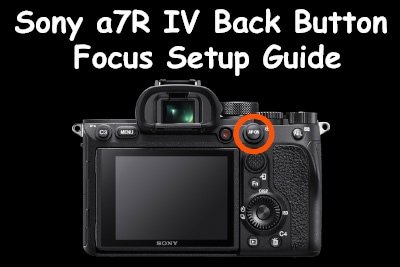
If you would prefer to use a back button to activate the autofocus on the Sony a7R IV instead of using the shutter button, then this short guide will explain how to set this up.
I’ve also created a short video guide showing how to do this but if you don’t like the sound of my voice, then just keep scrolling for the written steps.
Sony A7R IV Forum & Facebook Group
If you are looking for further help and advice on the A7R IV or would simply like to share your photos, then please head over to our friendly full-frame Forum. If you prefer Facebook then I also run the Sony A7R IV + A7R V Shooters Group.
Since I shoot a lot of sports and wildlife and I am probably shooting in AF-C mode 99% of the time, I prefer to use a back button to enable autofocus instead of half-pressing the shutter button.
Using this method I’m much less likely to fire the shutter accidentally and also when I remove my finger from the shutter button the focus will stay locked on so long as I have the back button pressed.
When using the shutter button to focus you’ll lift your finger off the shutter after shooting a burst but in doing so risk re-focusing and potentially losing track of your subject and missing shots, this isn’t an issue when using the back button focusing method.
To setup back button focusing on the a7R IV there are only two steps required.
Step 1. Turn Off Autofocus with Shutter
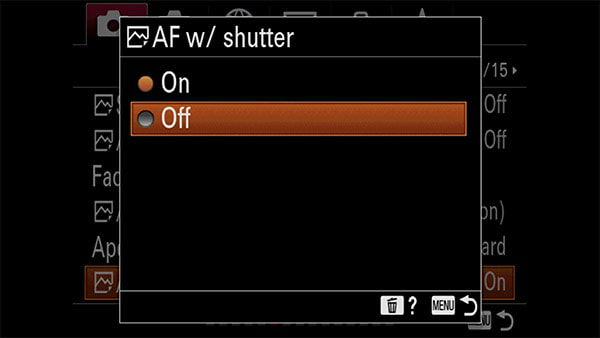
In the first step we want to remove the autofocus from the shutter button, so when pressed it will now only trigger the shutter and not the autofocus when half-pressed.
Hit the menu button on the back of the a7R IV and navigate to Camera Settings 1 > AF2 (6/15), then select the menu item [AF w / shutter] as shown below:
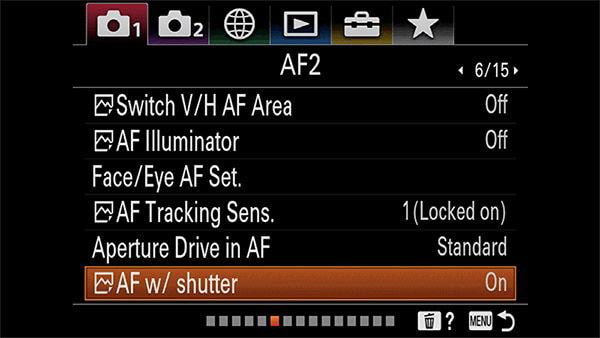
By default this is set to on, simply click the menu item and set this to off like shown below:
Step 2. AF-On Custom Button Setup
By default the Af-On button on the rear of the a7R IV is already setup to trigger the autofocus when pressed, so you shouldn’t need to follow these steps unless the function of this button has been changed. If it’s not working then here’s what you’ll need to do.
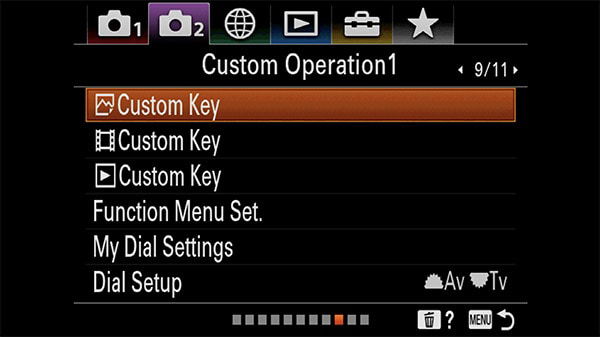
Hit the menu button on the back of the a7R IV and navigate to Camera Settings 2 > Custom Operation 1 (9/11) and select the first menu item [Custom Key] as shown below:
When you press the [Custom Key] menu item you should now see the following page:
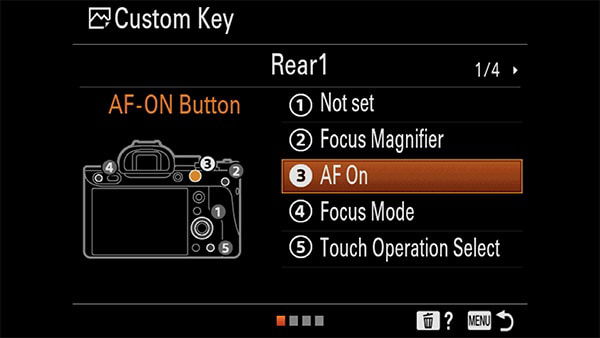
Check that custom key number 3 is assigned to the “AF-On” function. Providing it is you can now exit out of the menu, if it’s assigned to another function then you’ll need to select the AF-ON function from page 7/27 as shown below:
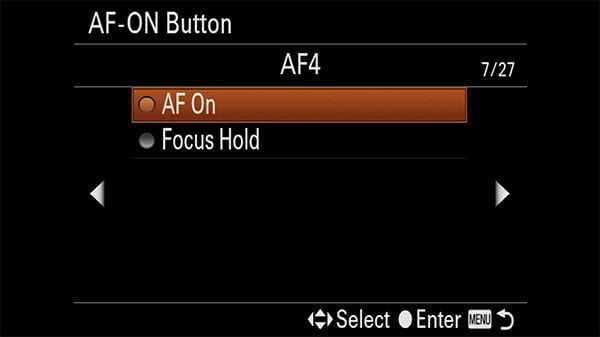
Providing everything has gone to plan your shutter button should no longer be activating the autofocus when half-pressed, instead the AF-On button is now used to enable the autofocus when held down.






Hi Adam,
I have a problem with my sony A7R3. When I half press the shutter button it focusses and fires the shutter, I want to just half press focus and full press shoot. Is this a setting in the sony A7 or is my shutter button broken?
Best,
Crispijn
Did you resolve this issue Crispijn? I’d recommend trying a camera reset to see if this fixes the issue, if not it could be a faulty shutter button.
A question that I have put in various FB groups, but get nobreal answer to.
How can I make the back focus button to work in Manual focus mode? It works exactly as you describe above in Auto focus modes. But the button becomes dead in Manual focus mode. And I am not talking about DMF which requires several buttons pressed simultaneously.
On my old RII I had assigned Af-On to the AEL button which worked EVEN if I was i Manual focus mode. It was very handy to have the camera in Manual focus mode all the time, but with a press on AEL get a quick starting point, and going direct to manual focus if needed. I used it extensively instead of the sometimes not reliable eye-focus. I was in total control on where to focus and when, and with a diect twist on the lens I got an enlarged view. No extra buttons to press.
It seems as I can’t get the same functionality on R IV?
Unfortunately I don’t think such a setup is possible with the a7R IV Bo. Your only options are probably DMF or setting a custom button to toggle between AF-C and M modes.
As a wildlife and sports photographer for many years, I was an early adopter of BBF once it was first enabled. It afforded the ability to start af/tracking earlier without setting exposure and could be used as single shot focus. Nonetheless, I’ve recently abandoned it with the a7riv. Why? I shoot in M mode nearly all of the time so the 1/2 press of the shutter release button no longer locks exposure. More importantly, I was struggling with the a7riv’s af accuracy in AFC mode resulting in significant numbers of oof images, and wondered whether pressing two buttons simultaneously (BBF and shutter button) cancelled the BBF button out. I don’t have any information supporting this but since switching the af back to the shutter button, the af accuracy has improved for sequences.
Hi Adam. Thanks for your comment. I think everyone has their own reasons for using BBF or not. Personally I prefer It to using the shutter button when shooting in AF-C Mode as I can take my finger off the shutter button after shooting a burst but keep holding the BBF to keep the tracking enabled (BIF for example). By using the shutter button for focusing I find I’m more likely to lose the focus lock if I lift my finger up a little too high after shooting a burst. I normally disable AF W / Shutter in the menu (step 1 in the article) if I’m using BBF. I just did a very quick test and they don’t appear to cancel each other out if you don’t disable it in the menu, but possibly shooting a little more could reveal some issues.
Even when AF is on for the shutter button, you can use BBF button pressed down for tracking. It overrides the AF on the shutter button.